Loading
Get Enrollment Application - Community Action Program Belknap ... - Bm-cap
How it works
-

Open form follow the instructions
-

Easily sign the form with your finger
-

Send filled & signed form or save
How to fill out the Enrollment Application - Community Action Program Belknap ... - Bm-cap online
This guide provides a clear and systematic approach to completing the Enrollment Application for the Community Action Program Belknap online. By following the outlined steps, applicants can ensure that their submissions are accurate and complete.
Follow the steps to successfully fill out your application online.
- Use the ‘Get Form’ button to access the Enrollment Application and open it in your preferred online editor.
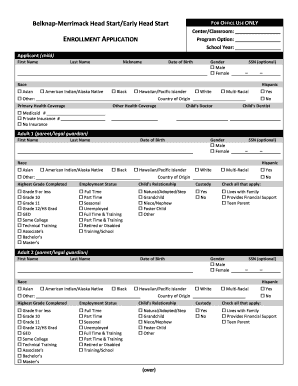
- Complete the applicant section with the child's first name, last name, nickname, date of birth, and gender. Indicate whether the child's Social Security Number (SSN) will be provided.
- In the race section, select the appropriate options that apply to the child. Provide details regarding the child's country of origin and health coverage.
- Proceed to the adult guardian sections. Fill out the first guardian's first name, last name, date of birth, gender, SSN, and race. Include the highest grade completed and current employment status.
- Indicate the relationship of the adult to the child and any relevant custody information. Repeat the previous step for the second adult guardian if applicable.
- List any additional children in the household, filling out their names, dates of birth, and gender. Include any necessary details on the back of the application if there are more than three children.
- Fill in the family information section, providing the living address and, if different, the mailing address. Include phone numbers and an email address to ensure easy communication.
- Indicate whether you can transport your child to the center. Provide details regarding parents living in the home, total family members, and any relevant information about homelessness or military family status.
- In the special concerns and family circumstances section, provide information on any special needs, mental health services, or other relevant family situations.
- Conclude with the family income section, ensuring to detail all sources of income and verifying with appropriate documentation such as tax returns or pay stubs.
- Finally, review the certification statement, sign and date the form to ensure that all provided information is true and accurate. Save the completed form, download, print, or share it as needed.
Start completing your Enrollment Application online today for a smoother process.