Loading
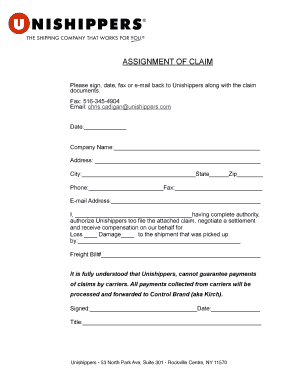
Get Assignment Of Claims Form - Unishippers
How it works
-

Open form follow the instructions
-

Easily sign the form with your finger
-

Send filled & signed form or save
How to fill out the Assignment Of Claims Form - Unishippers online
Filling out the Assignment Of Claims Form - Unishippers can be a straightforward process when you know the steps to follow. This guide provides clear instructions to help you complete the form effectively and efficiently.
Follow the steps to complete the Assignment Of Claims Form
- Press the ‘Get Form’ button to obtain the Assignment Of Claims Form and open it in the online editor.
- Enter the date on which you are filling out the form in the designated field.
- Input your company name in the appropriate field. Ensure accuracy for future reference.
- Fill in your complete address, including street address, city, state, and zip code in the specified sections.
- Provide your phone number and fax number in the corresponding fields, ensuring you include area codes.
- Enter your email address accurately to facilitate communication regarding your claim.
- In the section where you authorize Unishippers, write your name clearly, confirming you have the authority to make this decision.
- Indicate the type of claim you are filing by marking either 'Loss' or 'Damage' as applicable.
- Complete the section detailing the shipment, including who picked it up, and provide the freight bill number.
- Understand that Unishippers cannot guarantee payments of claims. Verify your understanding of this note before proceeding.
- Sign and date the form where indicated at the bottom to finalize your submission.
- After reviewing all entries for accuracy, save changes, and you may choose to download, print, or share the completed form as needed.
Complete the Assignment Of Claims Form online today to ensure your claims process is in motion.
For more than 30 years, our 200+ franchises have put their small business mindset to work, developing solutions for the unique needs of SMB shippers like you.