Loading
Get Download - Divorce Papers And Divorce Forms
How it works
-

Open form follow the instructions
-

Easily sign the form with your finger
-

Send filled & signed form or save
How to fill out the Download - Divorce Papers And Divorce Forms online
Filling out divorce papers online can seem daunting, but with the right guidance, you can navigate the process smoothly. This guide provides step-by-step instructions to help you fill out the Download - Divorce Papers And Divorce Forms accurately and efficiently.
Follow the steps to complete your divorce forms online.
- Click the ‘Get Form’ button to access the form and open it in your document editor.
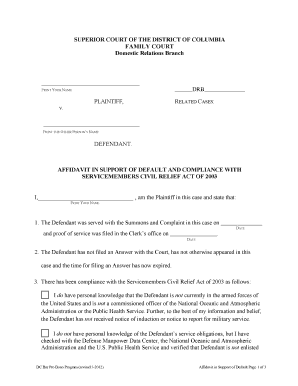
- Begin by printing your name in the designated space at the top of the form, which identifies you as the Plaintiff in this case.
- Next, print the other person’s name in the appropriate section to identify the Defendant.
- In the section regarding proof of service, enter the date the Defendant was served with the Summons and Complaint and the date when proof of service was filed with the Clerk's office.
- Indicate compliance with the Servicemembers Civil Relief Act of 2003 by selecting the appropriate checkbox based on your knowledge of the Defendant’s military status. Fill in any required information as necessary.
- Conclude the affidavit by signing your name, entering the date, and providing your street address, city, state, zip code, and telephone number. If applicable, check the box indicating you have a substitute address for protection.
- After verifying that all sections are completed accurately, save any changes, and proceed to download, print, or share the form as needed.
Start filling out your divorce documents online today to ensure a smooth and efficient process.
File the papers with the County Clerk's Office. The County Clerk's Office is where the court fees are paid and where the case files in the county are kept for the Supreme Court. You may be able to file the papers over the internet using NYSCEF, the New York State Courts Electronic Filing system.