Loading
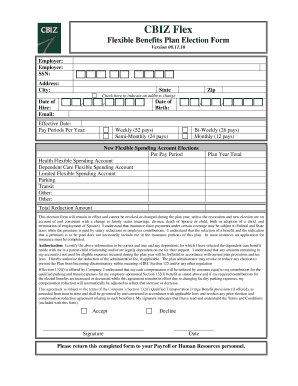
Get Cbiz Flex Flexible Benefits Plan Election Form
How it works
-

Open form follow the instructions
-

Easily sign the form with your finger
-

Send filled & signed form or save
How to fill out the CBIZ Flex Flexible Benefits Plan Election Form online
Filling out the CBIZ Flex Flexible Benefits Plan Election Form online is a straightforward process that allows you to select your benefit options conveniently. This guide will walk you through each section of the form, ensuring that you complete it accurately and effectively.
Follow the steps to complete your election form online.
- Click ‘Get Form’ button to obtain the form and open it in the editor.
- Start by entering your personal information in the designated fields, including your name, social security number, and current address. Make sure to check the box if you have had an address change.
- Provide your date of hire and date of birth in the appropriate fields to ensure accurate record-keeping.
- Select the effective date for your benefits to begin. Indicate how many pay periods per year you have: Weekly (52 pays), Semi-Monthly (24 pays), Bi-Weekly (26 pays), or Monthly (12 pays).
- Fill in your new flexible spending account elections by specifying the amounts per pay period for Health Flexible Spending Account, Dependent Care Flexible Spending Account, Limited Flexible Spending Account, Parking, Transit, and any Other options available.
- Calculate and enter the total reduction amount for your selected benefits plan.
- Read the terms and conditions carefully to understand that elections cannot be changed during the plan year unless due to a qualifying life event. Acknowledge your understanding by checking the authorization box.
- Provide your signature and date at the bottom of the form, indicating your agreement with all terms and confirming the information you have provided is accurate.
- Once you have completed all sections, save your changes, and prepare to download, print, or share the completed form with your Payroll or Human Resources personnel.
Complete your CBIZ Flex Flexible Benefits Plan Election Form online today to ensure your benefits are set up correctly.
A flexible spending account or arrangement is an account you use to save on taxes and pay for qualified expenses. ... Only you and your employer can put money in an FSA, up to a limit set each year by the IRS. FSAs are a use it or lose it account; your employer can keep funds you haven't used by the end of the year.