Loading
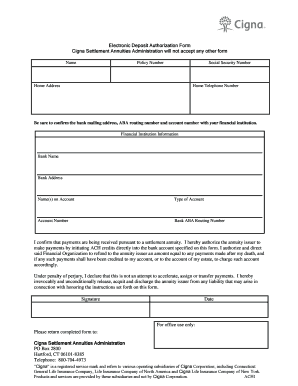
Get Electronic Deposit Authorization Form Cigna Settlement ...
How it works
-

Open form follow the instructions
-

Easily sign the form with your finger
-

Send filled & signed form or save
How to fill out the Electronic Deposit Authorization Form Cigna Settlement online
This guide provides clear, step-by-step instructions on how to complete the Electronic Deposit Authorization Form for the Cigna Settlement online. By following these instructions, you will ensure accurate submission of your information for direct deposit.
Follow the steps to successfully complete and submit the form online.
- Click ‘Get Form’ button to obtain the form and open it in the editor.
- Begin by entering your full name in the designated field at the top of the form. Ensure that the name matches the one associated with your policy.
- In the next field, input your policy number as provided in your settlement documentation. This helps in identifying your account.
- Enter your Social Security number in the appropriate section. Ensure that this is accurate to avoid any issues with processing.
- Fill out your home address, making sure to include street address, city, state, and zip code for accurate delivery.
- Input your home telephone number for communication regarding your account.
- Next, complete the financial institution information. Begin with the name of your bank, followed by its mailing address.
- Indicate the name(s) on the account that will receive the payments. Ensure this matches the bank records.
- Select the type of account (checking or savings) in the specified field.
- Enter your account number carefully, ensuring every digit is correct.
- Provide the bank's ABA routing number. Confirm this with your financial institution to avoid errors.
- Read the authorization statement and ensure you understand its implications. Two important declarations are included: your authorization for ACH credits and the acknowledgment of liability release.
- Sign the form in the signature section to verify your intent and agreement with the terms.
- Date the form to mark when you completed the entries.
- Finally, review all information for accuracy. Once confirmed, you can save changes, download a copy for your records, print it out, or share it further as necessary.
Complete your Electronic Deposit Authorization Form online now for quick processing.
EFT, or direct deposit, electronically deposits claim fee-for-service and capitated payments directly into your bank account. You can access funds the same day as the deposit, while eliminating paper check mail delivery and handling.