Loading
Get 2014-2015 Dependent Verification Worksheet - Pasadena City Bb - Pasadena
How it works
-

Open form follow the instructions
-

Easily sign the form with your finger
-

Send filled & signed form or save
How to fill out the 2014-2015 Dependent Verification Worksheet - Pasadena City Bb - Pasadena online
Filling out the 2014-2015 Dependent Verification Worksheet is an important step in ensuring your eligibility for financial aid at Pasadena City College. This guide provides clear instructions for completing the form online, making the process as smooth as possible.
Follow the steps to complete your Dependent Verification Worksheet online.
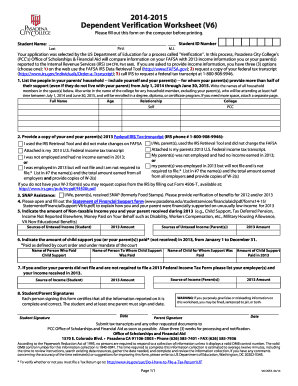
- Press the ‘Get Form’ button to access the 2014-2015 Dependent Verification Worksheet. This will allow you to fill out the form electronically.
- Begin by entering the student’s full name, including the first name, last name, and middle initial, in the designated fields.
- Input the student ID number in the specified field to identify the applicant correctly.
- In the first section of the worksheet, list all individuals in your parents' household, including yourself and any dependents. Indicate each person’s name, age, relationship to the student, and the college they will attend if applicable.
- Provide necessary tax transcript information for both you and your parents. Select the applicable option that describes your tax filing situation or indicate if your parents were not employed.
- Fill in the information regarding any Supplemental Nutrition Assistance Program (SNAP) benefits received, if applicable, and attach the required verification.
- Complete the Statement of Financial Support form, which explains how financial needs were met under low income, ensuring to include all necessary details.
- Indicate any non-taxable income received by you or your parents during 2013 in the provided sections.
- Fill out the child support information section, specifying who paid child support, the recipient, and the amount paid in 2013.
- If applicable, list employers and income received in 2013 for both you and your parents if no tax return was filed.
- Sign and date the form at the end, ensuring that both the student and at least one parent’s signatures are present.
- Finalize the process by saving the filled-out form. You can then print, download, or share it as needed.
Complete your 2014-2015 Dependent Verification Worksheet online to ensure a smooth financial aid process.
You need to call (800) 433-3243 and have the federal processor add UCLA's name and school code 001315 to your SAR.