Loading
Get Credit Application Form - Holcim New Zealand Ltd
How it works
-

Open form follow the instructions
-

Easily sign the form with your finger
-

Send filled & signed form or save
How to fill out the Credit Application Form - Holcim New Zealand Ltd online
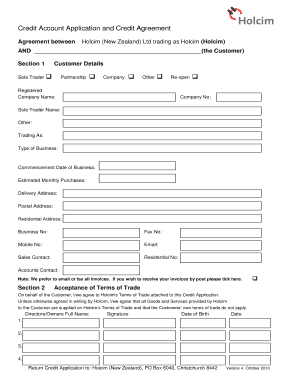
Filling out the Credit Application Form for Holcim New Zealand Ltd is a straightforward process that allows you to apply for a credit account. This guide provides clear instructions to assist you in completing the form accurately and efficiently, ensuring a smooth application experience.
Follow the steps to complete the form online.
- Click ‘Get Form’ button to access the Credit Application Form. This will open the form in your preferred digital editor where you can begin filling it out.
- Start by providing your Customer Details. Indicate your business structure by selecting one of the options: Sole Trader, Partnership, Company, or Other. Fill in your registered company name, company number (if applicable), and other required fields including the trading name, type of business, and commencement date.
- In Section 2, review and accept Holcim's Terms of Trade. You'll need to provide the names of the directors or owners and their signatures along with their date of birth.
- In Section 4, fill out the personal guarantee details. The guarantor(s) must sign and provide their names and addresses, confirming their acknowledgment of the application and terms.
- After you have finalized the application, save your changes. You will then have the option to download, print, or share the application form based on your needs.
Complete your documents online now to secure your credit account with Holcim.