Loading
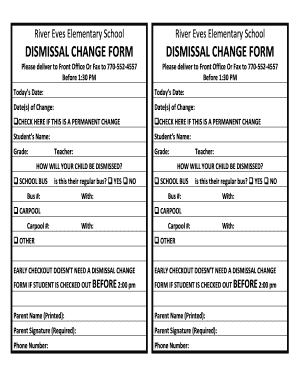
Get Dismissal Change Form Dismissal Change Form - Fulton County Schools - School Fultonschools
How it works
-

Open form follow the instructions
-

Easily sign the form with your finger
-

Send filled & signed form or save
How to fill out the Dismissal Change Form - Fulton County Schools online
Filling out the Dismissal Change Form for Fulton County Schools is an essential process for ensuring your child's safe dismissal from school. This guide provides clear instructions on how to complete the form accurately and online, helping you navigate each section with ease.
Follow the steps to successfully fill out the dismissal change form online.
- To begin, click the ‘Get Form’ button to access the Dismissal Change Form. This will open the document in your chosen editor for you to fill out.
- Enter today's date in the designated field at the top of the form. This is important to ensure the school has the correct timeframe for the dismissal change.
- Fill in the date(s) of the change in the provided space, indicating when the new dismissal plan will be effective.
- If this dismissal change is permanent, check the box labeled ‘CHECK HERE IF THIS IS A PERMANENT CHANGE.’
- Provide your child's name in the section labeled ‘Student’s Name.’ This will help the school identify the student associated with the dismissal change.
- Indicate your child's grade and their teacher's name in the relevant fields.
- Select the method of dismissal for your child by checking the appropriate box (School Bus, Carpool, or Other). Fill in additional information, such as bus number or carpool number, if applicable.
- If your child will be taking the school bus, specify if it is their regular bus by checking ‘YES’ or ‘NO.’ Include the bus number and details about who will be with your child if applicable.
- For carpool arrangements, provide the carpool number and the names of those who will be with your child.
- Note that early checkout does not require a dismissal change form if your child is being checked out before 2:00 PM.
- Complete the parent name field, printing your name exactly as requested, and ensure to sign where indicated. Your signature is required for validation.
- Lastly, provide your phone number to allow the school to reach you if needed regarding the dismissal change.
- After you have filled out the form, make sure to review all the information for accuracy. You can then save your changes, download, print, or share the form as needed.
Complete your Dismissal Change Form online today to ensure your child's safe and timely dismissal!
Industry-leading security and compliance
US Legal Forms protects your data by complying with industry-specific security standards.
-
In businnes since 199725+ years providing professional legal documents.
-
Accredited businessGuarantees that a business meets BBB accreditation standards in the US and Canada.
-
Secured by BraintreeValidated Level 1 PCI DSS compliant payment gateway that accepts most major credit and debit card brands from across the globe.