Loading
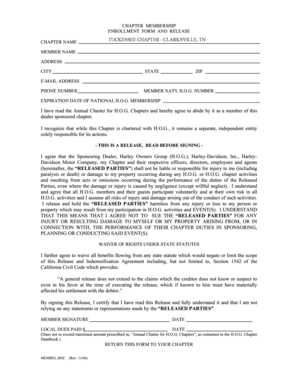
Get Tuckessee Chapter - Clarksville
How it works
-

Open form follow the instructions
-

Easily sign the form with your finger
-

Send filled & signed form or save
How to fill out the TUCKESSEE CHAPTER - CLARKSVILLE online
This guide provides a clear and comprehensive overview of how to fill out the TUCKESSEE CHAPTER - CLARKSVILLE form online. Following these instructions will help ensure that you complete the form accurately and efficiently.
Follow the steps to complete the membership enrollment form:
- Click the ‘Get Form’ button to obtain the form and open it in the online editor.
- Fill in your member name, ensuring you input your full legal name as it appears on your identification.
- Enter your address, including the street address, city, state, and ZIP code for accurate identification.
- Input your e-mail address, ensuring it is valid and accessible for correspondence regarding your membership.
- Provide your phone number; this should be a number where you can be easily reached.
- Enter your member national H.O.G. number, as well as the expiration date of your national H.O.G. membership.
- Read through the agreement to abide by the Annual Charter for H.O.G. Chapters and confirm your understanding.
- Carefully read the release and waiver of rights, acknowledging your understanding of the responsibilities and risks involved.
- Sign and date the document to validate your agreement to the terms stated.
- Indicate any local dues paid, making sure this amount complies with the stipulations of the Annual Charter.
- Once all fields are accurately filled, you may save the changes, download the form, print it, or directly share it as needed.
Complete your membership enrollment form online today!