Loading
Get Medical Certificate Philippines
How it works
-

Open form follow the instructions
-

Easily sign the form with your finger
-

Send filled & signed form or save
How to fill out the Medical Certificate Philippines online
The Medical Certificate Philippines is an essential document used for various purposes, including visa applications. This guide will provide a clear and supportive overview of how to accurately complete this online form to meet all requirements.
Follow the steps to complete your Medical Certificate online.
- Click ‘Get Form’ button to obtain the document and open it in your preferred editor.
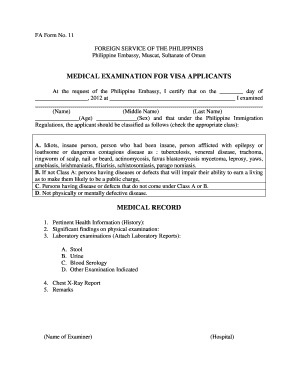
- Begin by providing the date of examination in the section labeled 'the ________ day of __________________'. Ensure that the date is clear and accurate.
- Next, fill in the location of the examination in the blank space following 'at ___________________________________________'. This should indicate where the examination was conducted.
- Complete the name section by entering the applicant's full name, including 'First Name', 'Middle Name', and 'Last Name'. Ensure correct spelling.
- Indicate the applicant’s age in the designated field '_______________(Age)' and gender in '_______________(Sex)'.
- Move to the classification section where you will check the appropriate class based on the applicant’s health assessment. Choose from Class A, Class B, Class C, or Class D based on the provided categories.
- In the Medical Record section, fill out pertinent health information in the space provided under '1. Pertinent Health Information (History):'. Include relevant medical history.
- For the physical examination findings, summarize notable observations in the field for '2. Significant findings on physical examination:'. Detail any relevant conditions identified.
- For laboratory examinations, attach the required laboratory reports. List the examinations such as stool, urine, blood serology, or others as needed under '3. Laboratory examinations (Attach Laboratory Reports):'.
- Include the Chest X-Ray report in the specified section '4. Chest X-Ray Report', ensuring to summarize the findings.
- Add any additional comments or remarks in the '5. Remarks' section as necessary.
- Finally, ensure the name of the examiner and the hospital are filled in at the bottom of the form. Review all entries for accuracy before finalizing.
- Once you have completed and reviewed the form, proceed to save your changes, download, print, or share the document as required.
Complete your Medical Certificate online today to streamline your application process.
Name and address of the patient. Name and address of the doctor/ medical practitioner. The exact period of leave/time off that is medically justifiable. Nature/ degree of incapacitation/ injury/ illness. Date of medical diagnosis and the date of issue of the certificate.