Loading
Form preview
  • US Legal Forms
  • Other Templates
  • More Forms
  • More Uncategorized Forms
  • This Form (pdf) - United Teletech Financial - Utfinancial

Get This Form (pdf) - United Teletech Financial - Utfinancial

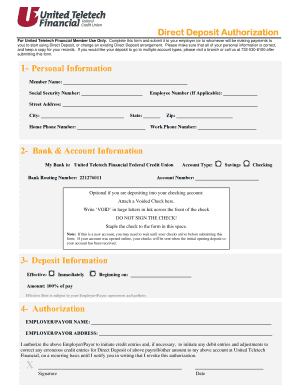
Direct Deposit Authorization For United Teletech Financial Member Use Only. Complete this form and submit it to your employer (or to whomever will be making payments to you) to start using Direct.

How it works

  1. Open form

    Open form follow the instructions

  2. Easily sign form

    Easily sign the form with your finger

  3. Share form

    Send filled & signed form or save

How to fill out the This Form (pdf) - United Teletech Financial - Utfinancial online

Filling out the Direct Deposit Authorization form for United Teletech Financial is essential for setting up or modifying your direct deposit arrangements. This guide will provide you with step-by-step instructions to ensure that you complete the form accurately and efficiently.

Follow the steps to successfully complete the Direct Deposit Authorization form.

  1. Press the ‘Get Form’ button to obtain the form and open it in your preferred PDF viewer.
  2. Begin by filling out the personal information section. Ensure you include your full name, social security number, employee number (if applicable), street address, city, state, home phone number, and zip code.
  3. In the bank and account information section, confirm that your bank is listed as United Teletech Financial Federal Credit Union. Enter the bank routing number which is 221276011. Choose the type of account you want to deposit into by marking either 'Savings' or 'Checking'. Fill in your account number.
  4. If you are setting up direct deposit for your checking account, you must attach a voided check by writing 'VOID' across the front in large letters and not signing it. Staple the voided check to the designated area on the form.
  5. In the deposit information section, select the effective date for your direct deposit. You can choose 'Immediately' or specify a date by filling in the requested field. The full amount of your pay will be deposited, unless you choose otherwise as per your employer's policies.
  6. Fill out the authorization section by entering your employer or payor's name and address. Sign the form and include the date to confirm your authorization for the employer/payor to initiate deposits into your account.
  7. Once you have filled out all sections of the form accurately, save your changes, and download or print the completed form for your records. Ensure that you submit the form to the appropriate entity responsible for processing your direct deposits.

Complete your documents online today to streamline your direct deposit setup.

Get form

Experience a faster way to fill out and sign forms on the web. Access the most extensive library of templates available.
Get form

Related content

CLFOM201624LArdine.pdf - National Credit Union...
United Teletech Financial Federal Credit Union is a community chartered credit union...
Learn more
UNITED STATES SECURITIES AND EXCHANGE ......
If any of the securities being registered on this Form are to be offered on a delayed...
Learn more

Related links form

NYEIN CHAN SU NCS TOY SOLDIERS DREAMSCAPES 2015 FPTA Camp Registration Form - Franklin Park Tennis - Franklinparktennis New Parishioners Form1 - Ealing Abbey - Ealingabbey Org Application For Employment Copy - Aloha Mixed Plate

Questions & Answers

Get answers to your most pressing questions about US Legal Forms API.

Contact support

Keeping your money and information safe is a top priority for United Teletech Financial Federal Credit Union. When you use Zelle® within our mobile app or online banking, your information is protected with the same technology we use to keep your bank account safe.

We are here to help. If you have questions about membership, our Member Care team is happy to help you. Fill out our quick contact form here or stop by one of our convenient branch locations. You can also call us at (732) 530-8100 ext. 2530.

Get Started with Zelle® ABCO Federal Credit Union. Abington Bank. ABNB. Academy Bank. Access Community Credit Union. ACCESSbank Omaha. ACFCU. Achieva Credit Union.

Hundreds of banks and credit unions of all sizes across the U.S. currently offer Zelle® in their banking apps or online banking.

You can use it with friends at other banks. Zelle® works between U.S.-based banks. Which means, even if you bank somewhere different than your friends and family do,1 you can still use Zelle® to safely send and receive money straight from your banking app.

Zelle® is now available in United Bank's mobile banking app (Bank With United). Zelle is a fast, safe and easy way to send money directly between almost any bank accounts in the U.S., typically within minutes1 .

Get This Form Now!

Use professional pre-built templates to fill in and sign documents online faster. Get access to thousands of forms.
Get form
If you believe that this page should be taken down, please follow our DMCA take down processhere.
Get This Form (pdf) - United Teletech Financial - Utfinancial
Get form
  • Adoption
  • Bankruptcy
  • Contractors
  • Divorce
  • Home Sales
  • Employment
  • Identity Theft
  • Incorporation
  • Landlord Tenant
  • Living Trust
  • Name Change
  • Personal Planning
  • Small Business
  • Wills & Estates
  • Packages A-Z
  • Affidavits
  • Bankruptcy
  • Bill of Sale
  • Corporate - LLC
  • Divorce
  • Employment
  • Identity Theft
  • Internet Technology
  • Landlord Tenant
  • Living Wills
  • Name Change
  • Power of Attorney
  • Real Estate
  • Small Estates
  • Wills
  • All Forms
  • Forms A-Z
  • Other Templates
  • Legal Hub
  • About Us
  • Help Portal
  • Legal Resources
  • Blog
  • Affiliates
  • Contact Us
  • Delete My Account
  • Site Map
  • Industries
  • Forms in Spanish
  • Localized Forms
  • State-specific Forms
  • Forms Kit
  • Real Estate Handbook
  • All Guides
  • Notarize
  • Incorporation services
  • For Consumers
  • For Small Business
  • For Attorneys
  • USLegal
  • FormsPass
  • pdfFiller
  • signNow
  • altaFlow
  • DocHub
  • Instapage
Form Packages
  • Adoption
  • Bankruptcy
  • Contractors
  • Divorce
  • Home Sales
  • Employment
  • Identity Theft
  • Incorporation
  • Landlord Tenant
  • Living Trust
  • Name Change
  • Personal Planning
  • Small Business
  • Wills & Estates
  • Packages A-Z
Form Categories
  • Affidavits
  • Bankruptcy
  • Bill of Sale
  • Corporate - LLC
  • Divorce
  • Employment
  • Identity Theft
  • Internet Technology
  • Landlord Tenant
  • Living Wills
  • Name Change
  • Power of Attorney
  • Real Estate
  • Small Estates
  • Wills
  • All Forms
  • Forms A-Z
  • Other Templates
Customer Service
  • Legal Hub
  • About Us
  • Help Portal
  • Legal Resources
  • Blog
  • Affiliates
  • Contact Us
  • Delete My Account
  • Site Map
  • Industries
  • Forms in Spanish
  • Localized Forms
  • State-specific Forms
  • Forms Kit
Legal Guides
  • Real Estate Handbook
  • All Guides
Prepared for you
  • Notarize
  • Incorporation services
Our Customers
  • For Consumers
  • For Small Business
  • For Attorneys
Our Sites
  • USLegal
  • FormsPass
  • pdfFiller
  • signNow
  • altaFlow
  • DocHub
  • Instapage
Social Media
Call us now toll free:
+1 833 426 79 33
As seen in:
© Copyright 1999-2026 airSlate Legal Forms, Inc. 17 Station Street, Ste. 203, Brookline, MA 02445
  • Your Privacy Choices
  • Terms of Service
  • Privacy Notice
  • Content Takedown Policy
  • Bug Bounty Program