Loading
Get Voter Registration Cancellation Form - Ohio Secretary Of State - Votewayne
How it works
-

Open form follow the instructions
-

Easily sign the form with your finger
-

Send filled & signed form or save
How to fill out the Voter Registration Cancellation Form - Ohio Secretary Of State - Votewayne online
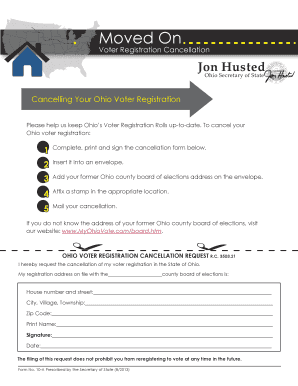
Cancelling your voter registration in Ohio is a straightforward process. This guide provides step-by-step instructions on how to complete the Voter Registration Cancellation Form efficiently and accurately.
Follow the steps to complete the cancellation form online.
- Click ‘Get Form’ button to obtain the cancellation form and open it in the editor.
- Fill in the required fields, including your house number and street, city or village, township, and zip code. Ensure that the information matches your previous voter registration details.
- Print your name clearly as it should appear on file.
- Sign the form to confirm your request for cancellation.
- Date the form appropriately to indicate when you are submitting your cancellation request.
- Insert the completed form into an envelope and address it to your former Ohio county board of elections. If you are unsure about the address, you can find it by visiting the specified resource.
- Affix a stamp to the envelope in the appropriate location.
- Mail your cancellation form and ensure it is sent as per the postal requirements.
Complete your voter registration cancellation form online today to ensure your registration is up-to-date.
Related links form
Industry-leading security and compliance
US Legal Forms protects your data by complying with industry-specific security standards.
-
In businnes since 199725+ years providing professional legal documents.
-
Accredited businessGuarantees that a business meets BBB accreditation standards in the US and Canada.
-
Secured by BraintreeValidated Level 1 PCI DSS compliant payment gateway that accepts most major credit and debit card brands from across the globe.