Loading
Get Zydus School Worksheet
How it works
-

Open form follow the instructions
-

Easily sign the form with your finger
-

Send filled & signed form or save
How to fill out the Zydus School Worksheet online
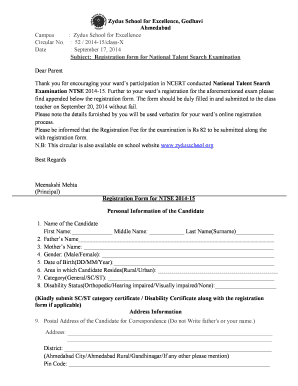
Filling out the Zydus School Worksheet online is an essential process for registration in the National Talent Search Examination. This guide provides clear, step-by-step instructions to help you complete the form accurately and efficiently.
Follow the steps to successfully complete the Zydus School Worksheet online.
- Press the ‘Get Form’ button to obtain the Zydus School Worksheet and open it in your preferred editing tool.
- Begin by filling in the personal information of the candidate. Include their first name, middle name, and last name in the designated fields.
- Next, provide the names of the father and mother in the respective fields.
- Indicate the candidate's gender by selecting 'Male' or 'Female' as applicable.
- Enter the date of birth of the candidate in the format of day, month, and year.
- Specify whether the candidate resides in a rural or urban area.
- Select the category of the candidate by choosing from 'General', 'SC', or 'ST.'
- Indicate the disability status of the candidate, choosing from options such as 'Orthopedic,' 'Hearing impaired,' 'Visually impaired,' or 'None.' If relevant, ensure to submit the appropriate certificate along with the form.
- Fill in the postal address of the candidate for correspondence. Ensure you do not write the names of the father or the candidate themselves.
- In the school information section, provide the name and address of the school where the candidate is studying in Class X.
- Select the examination medium for both state and NCERT levels
- Provide the educational qualifications of the father, selecting from the provided options.
- Document the father’s occupation by selecting the most applicable from the list provided.
- Similarly, provide the educational qualifications of the mother.
- Fill in the mother’s occupation following the same procedure.
- State the total number of family members living in the house.
- Indicate the number of brothers and sisters.
- Provide the candidate's birth order among their siblings.
- Record the parental annual income in the specified range.
- Input mobile and telephone numbers. Include the STD code along with the phone number.
- Lastly, enter the email ID of the candidate.
- Review all sections for accuracy. Ensure that the declaration at the end of the form is signed by both the candidate and the parent.
- Once complete, save your changes, and download or print the form as needed for submission.
Begin your online completion of the Zydus School Worksheet now!
Jayshree Balasaria - Principal - The Zydus School for Excellence, Godhavi,Ahmedabad | LinkedIn.
Industry-leading security and compliance
US Legal Forms protects your data by complying with industry-specific security standards.
-
In businnes since 199725+ years providing professional legal documents.
-
Accredited businessGuarantees that a business meets BBB accreditation standards in the US and Canada.
-
Secured by BraintreeValidated Level 1 PCI DSS compliant payment gateway that accepts most major credit and debit card brands from across the globe.