Loading
Get Skyward Alpine
How it works
-

Open form follow the instructions
-

Easily sign the form with your finger
-

Send filled & signed form or save
How to fill out the Skyward Alpine online
Filling out the Skyward Alpine form is a crucial process for keeping student information up-to-date within the Alpine School District. This guide will walk you through each step to ensure a smooth online enrollment experience.
Follow the steps to successfully complete the Skyward Alpine form online.
- Press the ‘Get Form’ button to access the online form and open it in your document editor.
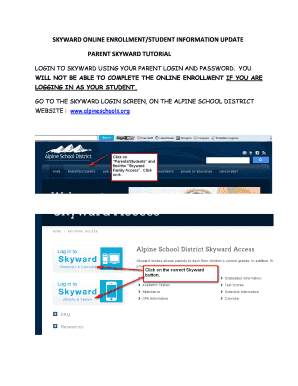
- Log into Skyward using your parent login and password. Please remember, logging in as your student will not allow access to the online enrollment.
- If you forget your login credentials, click ‘Forgot my login and password’ and enter the email address you provided to the school for Skyward, so your login details can be sent to you.
- Once logged in, navigate to the online enrollment screen. You will see multiple steps listed. Click on each step to open and review the information.
- In step one, you will see student details. Make any necessary changes, ensuring that names match the legal names on birth certificates, then save your changes before moving to the next step.
- Remember, if you need to change your address, contact the school directly. Health information changes will automatically be sent to the school nurse for approval.
- After marking step one as completed, proceed to step two and mark it as completed as well.
- In step three, verify the permission details for your student to use the internet, save your changes, and then mark this step as completed.
- Continue through steps four and five, marking each as completed after reviewing. Step five will include email notification preferences for grading and attendance.
- Complete any remaining steps that are school-related. Ensure to follow the instructions provided in each section.
- Once you complete all steps, click the final button at the bottom of the page to finalize the process.
- You will see a summary of steps completed with no changes made. Congratulations on successfully updating your student information!
- If you have other children in the school district, repeat this process for each student by switching between their information using the dropdown arrow next to their name.
- You can continue to log in throughout the school year to make any changes to contact information as needed.
Start filling out the Skyward Alpine form online today to ensure your student's information is current!
Industry-leading security and compliance
US Legal Forms protects your data by complying with industry-specific security standards.
-
In businnes since 199725+ years providing professional legal documents.
-
Accredited businessGuarantees that a business meets BBB accreditation standards in the US and Canada.
-
Secured by BraintreeValidated Level 1 PCI DSS compliant payment gateway that accepts most major credit and debit card brands from across the globe.