Loading
Get Community Connections
How it works
-

Open form follow the instructions
-

Easily sign the form with your finger
-

Send filled & signed form or save
How to fill out the COMMUNITY CONNECTIONS online
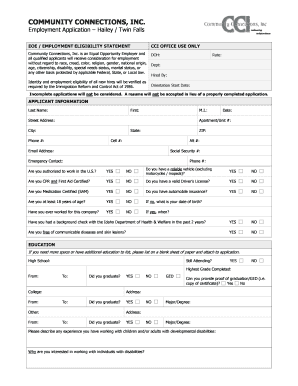
Filling out the COMMUNITY CONNECTIONS employment application is an important step towards joining Community Connections, Inc. This guide provides clear instructions on how to accurately complete the application to strengthen your chances of being considered for employment.
Follow the steps to complete your application effectively.
- Press the ‘Get Form’ button to access the COMMUNITY CONNECTIONS employment application and open it for editing.
- Begin by entering your personal information in the 'APPLICANT INFORMATION' section. Fill out your last name, first name, middle initial, street address, apartment/unit number, city, state, phone number, cell number, alternate number, email address, social security number, and emergency contact details.
- Indicate your work authorization status by selecting 'YES' or 'NO' regarding your ability to work in the U.S. Additionally, answer questions regarding vehicle reliability, CPR and First Aid certification, driver's license validity, medication certification, automobile insurance, age, prior employment with COMMUNITY CONNECTIONS, background checks, and communicable diseases.
- In the 'EDUCATION' section, provide details about your education history. List the name of your high school, college, and any other relevant education, including whether you graduated. If you have additional education to include, attach a separate sheet.
- Describe your experience working with individuals with developmental disabilities and explain your motivation for working in this field.
- In the 'PREVIOUS EMPLOYMENT' section, list all previous employers starting from the most recent. Provide details such as company name, supervisor, job title, pay rates, responsibilities, and whether references can be contacted.
- List two professional or personal references in the 'REFERENCES' section, including their full names, relationship to you, company names, phone numbers, addresses, and how long you have known them.
- Specify the position for which you are applying in the 'EMPLOYMENT DESIRED' section. Indicate your availability (full-time or part-time), desired pay rate, hours you are available, and any potential schedule changes in the coming months.
- Answer the legal background questions truthfully. This includes questions regarding arrests, convictions, and ongoing investigations.
- In the 'TRAVEL / VEHICLE USE' section, confirm your willingness to use your vehicle for transporting participants, and indicate the areas you are willing to work in.
- List any certifications and relevant experiences that apply to the position you are seeking.
- Review the legal agreement at the end of the application. Ensure you understand the conditions outlined, certify the accuracy of your information, and provide your signature along with the date to complete your application.
Complete your application online today to take the next step in your career with Community Connections, Inc.
Community connections for children: family, friends, neighbours and local organisations. Community connections can give children a sense of belonging and help them develop social and other skills. Children's community connections might include extended family and friends, neighbours and people in local organisations.
Industry-leading security and compliance
US Legal Forms protects your data by complying with industry-specific security standards.
-
In businnes since 199725+ years providing professional legal documents.
-
Accredited businessGuarantees that a business meets BBB accreditation standards in the US and Canada.
-
Secured by BraintreeValidated Level 1 PCI DSS compliant payment gateway that accepts most major credit and debit card brands from across the globe.