Loading
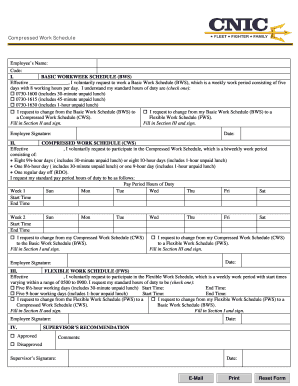
Get Compressed Work Schedule Form - Navy Mwr - Navymwr
How it works
-

Open form follow the instructions
-

Easily sign the form with your finger
-

Send filled & signed form or save
How to fill out the Compressed Work Schedule Form - Navy MWR - Navymwr online
Filling out the Compressed Work Schedule Form is an important step in managing your work hours effectively within the Navy MWR framework. This guide will help users navigate the form by providing clear instructions tailored to your needs.
Follow the steps to complete the form successfully.
- Click the ‘Get Form’ button to access the Compressed Work Schedule Form and open it in your preferred editor.
- In Section I, enter your name and code at the top of the form and indicate your current Basic Work Schedule (BWS) hours by checking the appropriate box. Specify the effective date for your request.
- If you want to transition to a Compressed Work Schedule (CWS), check the corresponding box and fill in Section II with your desired CWS details, including the effective date and your proposed hours, ensuring to outline your start and end times for each week.
- Complete Section III if you wish to apply for a Flexible Work Schedule (FWS), entering your effective date and selecting your desired hours by checking the relevant box.
- Once you have filled in the necessary sections, ensure to provide your signature and date at the end of the form to validate the request.
- Review all information to ensure accuracy, then save your changes, and proceed to download, print, or share the completed form as needed.
Start completing your Compressed Work Schedule Form online today!
A compressed work schedule allows an employee to work a traditional 35-40 hour workweek in less than five workdays. For example, a full-time employee could work four 10-hour days instead of five 8-hour days.