Loading
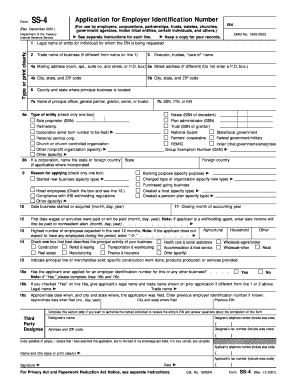
Get 29 Obtaining Ein From Irs Sample.pdf - Navy Mwr - Navymwr
How it works
-

Open form follow the instructions
-

Easily sign the form with your finger
-

Send filled & signed form or save
How to fill out the 29 Obtaining EIN From IRS Sample.pdf - Navy MWR - Navymwr online
This guide provides clear and comprehensive instructions to assist users in filling out the 29 Obtaining EIN From IRS Sample.pdf - Navy MWR - Navymwr. Whether you are familiar with tax forms or are a first-time filer, you will find step-by-step guidance tailored to your needs.
Follow the steps to complete the form successfully.
- Click the ‘Get Form’ button to obtain the document and access it for editing. This will allow you to fill out the necessary details requested in the form.
- Complete Line 1 by entering the legal name of the entity or individual for whom the EIN is being requested. Ensure the name matches the appropriate legal documents without abbreviations.
- In Line 2, provide the trade name of your business if it differs from the legal name. This should represent the name under which you operate your business.
- If applicable, fill out Line 3 with the name of the executor or trustee or any 'care of' name if there is a designated person for tax correspondence.
- For Lines 4a and 5a, enter the mailing address and street address, respectively. Ensure that if a 'care of' name is provided, the address reflects that individual's address.
- Line 6 requires you to specify the county and state where your principal business is located, while Line 7a needs the name of the principal officer or owner, along with their SSN, if applicable.
- In Line 8a, check the box that best describes the type of entity applying for the EIN. Details may include whether you're a sole proprietor or corporation.
- Indicate the reason for applying in Line 9, selecting from options such as starting a new business or hired employees, and provide specific details where necessary.
- For Line 10, enter the date your business started or was acquired. Line 11 requires the closing month of your accounting year.
- In Line 12, specify the first date wages will be paid if applicable, and in Line 13, indicate the highest number of expected employees for the next 12 months.
- Lines 14 and 15 should reflect the principal activity of your business and describe in detail the line of merchandise sold or services provided.
- For Line 16, if you have applied for an EIN before, indicate that in Line 16a, and provide the necessary details in Lines 16b and 16c.
- Complete the Third Party Designee section if you wish to authorize someone to handle inquiries about the EIN process.
- Finally, ensure the application is signed and dated by the appropriate individual, and review all entries for accuracy before submission.
- Upon completion, save your changes, download the form, print it for your records, or share it as needed. Ensure you keep a copy for your files.
Start filling out your documents online today!
An EIN is a 9-digit number (for example, 12-3456789) assigned to employers, sole proprietors, corporations, partnerships, estates, trusts, certain individuals, and other entities for tax filing and reporting purposes. Note: Keep the Form SS-4 information current.
Industry-leading security and compliance
US Legal Forms protects your data by complying with industry-specific security standards.
-
In businnes since 199725+ years providing professional legal documents.
-
Accredited businessGuarantees that a business meets BBB accreditation standards in the US and Canada.
-
Secured by BraintreeValidated Level 1 PCI DSS compliant payment gateway that accepts most major credit and debit card brands from across the globe.