We use cookies to improve security, personalize the user experience, enhance our marketing activities (including cooperating with our marketing partners) and for other business use.
Click "here" to read our Cookie Policy. By clicking "Accept" you agree to the use of cookies. Read less
Read more
Accept
Loading
Form preview
  • US Legal Forms
  • Form Library
  • More Forms
  • More Uncategorized Forms
  • 1700-2 Bapplicationb To Marry-validation Of Marriage - Mccs Okinawa

Get 1700-2 Bapplicationb To Marry-validation Of Marriage - Mccs Okinawa

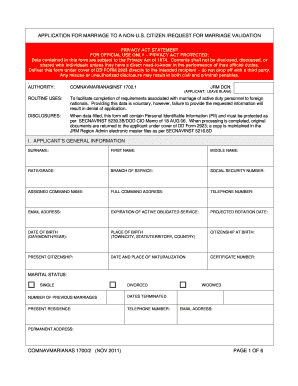
APPLICATION FOR MARRIAGE TO A NONU.S. CITIZEN /REQUEST FOR MARRIAGE VALIDATION PRIVACY ACT STATEMENT FOR OFFICIAL USE ONLY PRIVACY ACT PROTECTED: Data contained in this form are subject to the Privacy.

How it works

  1. Open form

    Open form follow the instructions

  2. Easily sign form

    Easily sign the form with your finger

  3. Share form

    Send filled & signed form or save

How to fill out the 1700-2 application to marry-validation of marriage - MCCS Okinawa online

Filling out the 1700-2 application is an essential process for active duty personnel wishing to marry a non-U.S. citizen. This guide provides a detailed, step-by-step approach to ensure the application is completed accurately and efficiently online.

Follow the steps to complete your application with ease.

  1. Press the ‘Get Form’ button to initiate the process of obtaining the application form. Make sure to have a reliable internet connection to access the online form smoothly.
  2. Carefully read the Privacy Act Statement provided at the beginning of the form. This section outlines the importance of protecting personal identifiable information and informs about the implications of misusing the information.
  3. Fill in the Applicant's General Information section. Include your surname, first name, middle name, branch of service, social security number, command address, and contact details. Ensure accuracy in your personal information as this will be essential for validation.
  4. Provide information about your marital status, including details of any previous marriages, if applicable. Specify the dates those marriages were terminated.
  5. Complete the section for the prospective alien spouse’s personal history statement. This includes their name, date of birth, citizenship details, and any previous marriages.
  6. Ensure that you have attached any required supplemental documents as specified in the form, such as certificates of completed marriage investigations or medical examinations.
  7. Read and sign the applicant’s certification, confirming that you have completed the necessary counseling by a legal officer and understand the implications regarding immigration.
  8. If applicable, complete the parental authorization section if either party is a minor. Provide printed names and signatures of the parents granting permission.
  9. Fill in the certification of medical examination section to confirm the applicant’s eligibility to marry, which may include results of mental health assessments and communicable diseases.
  10. Ensure that both the applicant and the prospective alien spouse sign the acknowledgment section regarding immigration status.
  11. Finally, complete the command endorsement section, where your command will provide approval for the marriage application. This should include the names and signatures of authorized personnel.
  12. Review the completed application for accuracy and completeness. Save any changes, and download or print the form for your records or to submit to the command.

Complete your form online to streamline your marriage application process!

Get form

Experience a faster way to fill out and sign forms on the web. Access the most extensive library of templates available.
Get form

Related links form

ONLINE DEALER APPLICATION - Wheels Manufacturing New Water Connection Application Form Mosh General Industry Checklist For Self-inspection - Dllr Templates Of Board Paper

Questions & Answers

Get answers to your most pressing questions about US Legal Forms API.

Contact support

If you were married abroad, contact the embassy or consulate of the country where the marriage was performed to obtain a certified copy of your foreign marriage document.

Yes, marriage licenses are a public record. Most states make the information available to the public through the county clerk's office in person or online. Sometimes, inquirers may need to submit a formal request with the necessary paperwork and fees.

A proxy marriage is a way to be legally married while at least one of the members of the couple is not present. It doesn't have to take the place of a wedding ceremony later.

The United States has no national registration of marriages, foreign or domestic. U.S. states recognize marriages performed in other states and in other countries. If your marriage was legally performed in the country or state where you got married, then the marriage is recognized in the United States.

You will need to fill out a Kon-in Todoke (request of registration of marriage) with 2 signatures from witnesses of any nationality who are over 18 years old.

Speak to an Experienced Attorney Generally, there must be a marriage license issued, a solemnization and authentication following the issuing of the license, and a recordation in the county where the solemnization/authentication took place. These three elements must be issued in this order to be a valid marriage.

If you get married abroad and need to know if your marriage will be recognized in the United States and what documentation may be needed, contact the office of the Attorney General of your state of residence in the United States. You can get information on obtaining a visa for a foreign spouse here.

Your marriage certificate. Your spouse's Social Security card. Your spouse's birth certificate. Your spouse's current photo identification card.

There is no military spouse pay or stipend, but the military offers a number of benefits to help service members and their families. Your first stop after the wedding should be the nearest military ID card issuing facility to enroll in DEERS, the Defense Enrollment Eligibility Reporting System.

You no longer have to ask formal permission to get married but some units do retain the tradition of asking the Commanding Officer for permission. It is probably best the soldier checks the form at their unit.

Get This Form Now!

Use professional pre-built templates to fill in and sign documents online faster. Get access to thousands of forms.
Get form
If you believe that this page should be taken down, please follow our DMCA take down processhere.

Industry-leading security and compliance

US Legal Forms protects your data by complying with industry-specific security standards.
  • In businnes since 1997
    25+ years providing professional legal documents.
  • Accredited business
    Guarantees that a business meets BBB accreditation standards in the US and Canada.
  • Secured by Braintree
    Validated Level 1 PCI DSS compliant payment gateway that accepts most major credit and debit card brands from across the globe.
Get 1700-2 BApplicationb To Marry-Validation Of Marriage - MCCS Okinawa
Get form
Form Packages
Adoption
Bankruptcy
Contractors
Divorce
Home Sales
Employment
Identity Theft
Incorporation
Landlord Tenant
Living Trust
Name Change
Personal Planning
Small Business
Wills & Estates
Packages A-Z
Form Categories
Affidavits
Bankruptcy
Bill of Sale
Corporate - LLC
Divorce
Employment
Identity Theft
Internet Technology
Landlord Tenant
Living Wills
Name Change
Power of Attorney
Real Estate
Small Estates
Wills
All Forms
Forms A-Z
Form Library
Customer Service
Terms of Service
Privacy Notice
Legal Hub
Content Takedown Policy
Bug Bounty Program
About Us
Help Portal
Legal Resources
Blog
Affiliates
Contact Us
Delete My Account
Site Map
Industries
Forms in Spanish
Localized Forms
State-specific Forms
Forms Kit
Legal Guides
Real Estate Handbook
All Guides
Prepared for You
Notarize
Incorporation services
Our Customers
For Consumers
For Small Business
For Attorneys
Our Sites
US Legal Forms
USLegal
FormsPass
pdfFiller
signNow
airSlate WorkFlow
DocHub
Instapage
Social Media
Call us now toll free:
+1 833 426 79 33
As seen in:
  • USA Today logo picture
  • CBC News logo picture
  • LA Times logo picture
  • The Washington Post logo picture
  • AP logo picture
  • Forbes logo picture
© Copyright 1997-2025
airSlate Legal Forms, Inc.
3720 Flowood Dr, Flowood, Mississippi 39232
Form Packages
Adoption
Bankruptcy
Contractors
Divorce
Home Sales
Employment
Identity Theft
Incorporation
Landlord Tenant
Living Trust
Name Change
Personal Planning
Small Business
Wills & Estates
Packages A-Z
Form Categories
Affidavits
Bankruptcy
Bill of Sale
Corporate - LLC
Divorce
Employment
Identity Theft
Internet Technology
Landlord Tenant
Living Wills
Name Change
Power of Attorney
Real Estate
Small Estates
Wills
All Forms
Forms A-Z
Form Library
Customer Service
Terms of Service
Privacy Notice
Legal Hub
Content Takedown Policy
Bug Bounty Program
About Us
Help Portal
Legal Resources
Blog
Affiliates
Contact Us
Delete My Account
Site Map
Industries
Forms in Spanish
Localized Forms
State-specific Forms
Forms Kit
Legal Guides
Real Estate Handbook
All Guides
Prepared for You
Notarize
Incorporation services
Our Customers
For Consumers
For Small Business
For Attorneys
Our Sites
US Legal Forms
USLegal
FormsPass
pdfFiller
signNow
airSlate WorkFlow
DocHub
Instapage
Social Media
Call us now toll free:
+1 833 426 79 33
As seen in:
  • USA Today logo picture
  • CBC News logo picture
  • LA Times logo picture
  • The Washington Post logo picture
  • AP logo picture
  • Forbes logo picture
© Copyright 1997-2025
airSlate Legal Forms, Inc.
3720 Flowood Dr, Flowood, Mississippi 39232