Loading
Get Skyward Lake County
How it works
-

Open form follow the instructions
-

Easily sign the form with your finger
-

Send filled & signed form or save
How to fill out the Skyward Lake County family access enrollment form online
This guide provides clear instructions for parents and guardians on how to complete the Skyward Lake County family access enrollment form online. By following these steps, you can easily access your child's academic information and ensure their progress is closely monitored.
Follow the steps to successfully complete the enrollment form.
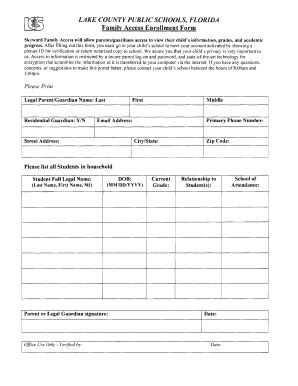
- Press the ‘Get Form’ button to download the Skyward Lake County family access enrollment form. This action will allow you to open the document for completion.
- Fill in the legal parent or guardian's name, including last name, first name, and middle initial as appropriate. Ensure accuracy for identification purposes.
- Indicate whether you are the residential guardian by selecting 'Yes' or 'No'. This information helps clarify your relationship and role.
- Provide your primary phone number and email address to facilitate communication and account setup notifications.
- Enter your street address, city, state, and zip code to establish your contact details.
- List all students residing in your household. For each student, input their full legal name, following the format 'Last Name, First Name, Middle Initial', along with their date of birth in MM/DD/YYYY format.
- Sign the form where indicated as the parent or legal guardian, and include the date of signing.
- Complete the ‘Office Use Only’ section, which may be filled out by the school staff. This area often includes verification details and the school of attendance.
- Review all filled-out information for accuracy. If everything is correct, save your changes. You may also choose to download, print, or share the completed form as needed.
Don't wait any longer—complete your Skyward Lake County family access enrollment form online today!
Visit Skyward. Click "Forgot your Login/Password?" You must have an email address already in Skyward in order for this to work. Enter your email address or user name and click "Submit." The email must match the email address you provided on the registration form.