Loading
Get Hasd Skyward
How it works
-

Open form follow the instructions
-

Easily sign the form with your finger
-

Send filled & signed form or save
How to fill out the Hasd Skyward online
Filling out the Hasd Skyward acceptance form online can be a straightforward process. This guide will walk you through each step, ensuring you provide all necessary information accurately and efficiently.
Follow the steps to complete the Hasd Skyward acceptance form online.
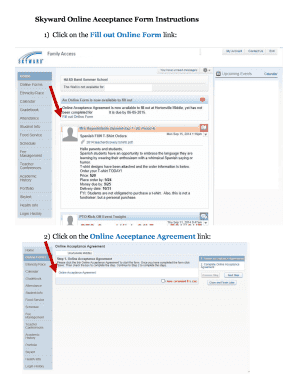
- To begin, click the ‘Get Form’ button to access the Hasd Skyward acceptance form. This will allow you to open the document in an online format for easy completion.
- Once the form is open, click on the link labeled ‘Online Acceptance Agreement’ to proceed to the next section of the form.
- Next, utilize the drop-down box provided to select either ‘Yes’ or ‘No,’ as appropriate for your acceptance of the terms outlined in the agreement.
- In the designated fields, type in the name of the parent and the current date. Ensure that all information is accurate and up-to-date.
- After completing the above steps, check the box labeled ‘I have completed this step’ to confirm your actions and prepare for submission.
- Finally, save your changes to the form. You can also download, print, or share the completed document as needed.
Start filling out the Hasd Skyward acceptance form online today!
Hortonville High School is an above average, public school located in HORTONVILLE, WI. It has 1,214 students in grades 9-12 with a student-teacher ratio of 18 to 1.