Loading
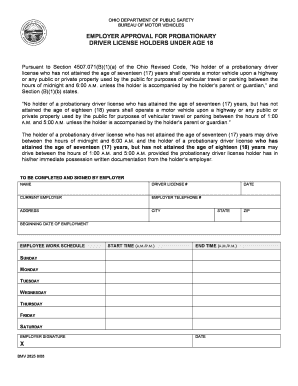
Get Oh Drivers License Renewal Form
How it works
-

Open form follow the instructions
-

Easily sign the form with your finger
-

Send filled & signed form or save
How to fill out the Oh Drivers License Renewal Form online
Renewing your driver's license can be a straightforward process when using the appropriate forms. This guide provides clear instructions on how to fill out the Oh Drivers License Renewal Form online, ensuring you meet the necessary requirements.
Follow the steps to successfully complete your Oh Drivers License Renewal Form.
- Press the ‘Get Form’ button to obtain the form and access it in your preferred editor.
- Begin by filling in the 'NAME' field with your full legal name as it appears on your identification documents.
- Next, enter your 'DRIVER LICENSE #' in the designated field, ensuring it is accurate to avoid delays in processing.
- Provide the 'DATE' on which you are completing the renewal form; this helps track your application timeline.
- Fill in the 'CURRENT EMPLOYER' section with the name of your employer if applicable. If you are not currently employed, you may indicate 'N/A'.
- In the 'EMPLOYER TELEPHONE #' field, input a valid contact number where your employer can be reached.
- Complete the 'ADDRESS' section with your employer’s business address, including city, state, and ZIP code.
- Specify the 'BEGINNING DATE OF EMPLOYMENT' by entering the date you commenced work at this employer.
- Outline your 'EMPLOYEE WORK SCHEDULE' by providing your regular work hours for each day of the week in the appropriate fields.
- Enter your 'START TIME' and 'END TIME' for each day, making sure to specify A.M. or P.M. for clarity.
- Once all fields are completed, you or your employer must sign the form in the 'EMPLOYER SIGNATURE' section, then date it to finalize.
- After reviewing the completed form for accuracy, you can save your changes, download, print, or share the form as needed.
Complete your Oh Drivers License Renewal Form online today for a smooth renewal process.
There are five elements a person must verify: your full legal name, date of birth, legal presence in the United States, social security number and residence address. You can prove your name, age and legal status with documents like a birth certificate or passport.