Loading
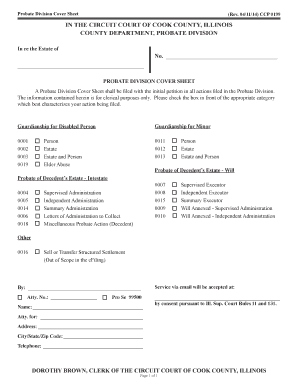
Get Probate Division Cover Sheet
How it works
-

Open form follow the instructions
-

Easily sign the form with your finger
-

Send filled & signed form or save
How to fill out the Probate Division Cover Sheet online
The Probate Division Cover Sheet is a critical document required when initiating actions in the Probate Division. This guide will provide you with step-by-step instructions to help you complete the form accurately and efficiently online.
Follow the steps to fill out the Probate Division Cover Sheet
- Click ‘Get Form’ button to obtain the form and open it in the editor.
- Carefully read the instructions at the top of the cover sheet. Understand that this form is for clerical purposes only and should be filed with your initial petition.
- Select the appropriate category that defines your action by checking the corresponding box. Categories include guardianship for a disabled person, guardianship for a minor, probate of a decedent’s estate with or without a will, and various other types of probate actions.
- If applicable, fill in the case number. This will typically be assigned upon filing your initial petition. If you do not have a case number, leave this section blank.
- Provide your attorney's information if you are represented by one, including their name, attorney number, and contact details. If you are filing the form on your own, check the box labeled 'Pro Se' and fill in your own name and contact information.
- Complete the section regarding email service. Insert your email address to allow for electronic communication with the court, as permitted under the relevant court rules.
- Finalize by reviewing your entries for accuracy. Ensure that all required fields are filled out correctly before proceeding.
- Once you have completed the form, you can save your changes, download the document, print it, or share it as necessary according to your filing requirements.
Complete your Probate Division Cover Sheet online and ensure your filing is accurate and timely.
Printable Probate forms can be accessed from the left side menu or the Sixth Judicial Circuit's website. These forms are also available for purchase at both of our Legal Resource Center locations.