Loading
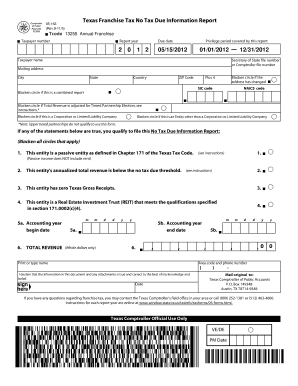
Get Blacken Circle If This Is A Corporation Or Limited Liability Company - Window Texas
How it works
-

Open form follow the instructions
-

Easily sign the form with your finger
-

Send filled & signed form or save
How to fill out the Blacken Circle If This Is A Corporation Or Limited Liability Company - Window Texas online
Filling out the Blacken Circle If This Is A Corporation Or Limited Liability Company - Window Texas form is an essential step for organizations looking to comply with Texas franchise tax reporting requirements. This guide provides clear, user-friendly instructions to help you navigate the form efficiently and accurately.
Follow the steps to fill out the form correctly.
- Click the ‘Get Form’ button to access the form online and open it in your chosen editor.
- Identify the filing requirements section and enter your total franchise taxpayer number, ensuring it matches your official documents.
- Specify the report year and due date. Make sure these dates are correct as they determine your filing period.
- Fill in the privilege period covered by this report, noting the start and end date accurately.
- Enter your taxpayer name, secretary of state file number or comptroller file number, and mailing address, ensuring that all information is complete.
- If your address has changed, blacken the circle indicating this adjustment.
- Complete the SIC code and NAICS code fields, which can be found in your business documentation.
- Blacken the appropriate circle if this is a combined report or if total revenue is adjusted for tiered partnership election.
- Here, blacken the circle if your entity is a corporation or limited liability company.
- If applicable, blacken the circle indicating your entity is a type other than a corporation or limited liability company.
- Review the statements for qualification criteria, blackening all circles that apply based on your entity’s situation.
- Fill in your accounting year start and end dates and total revenue. Ensure that you only use whole dollars where required.
- Enter the contact information, including your name and phone number, for verification.
- Affirm the accuracy of the document by signing and dating the form as required.
- Finally, save your changes, and choose to download, print, or share the completed form as needed.
Complete your documents online today to ensure timely and accurate filings.
LLCs and S-corps cannot qualify as passive entities, even if 90% of their income is from qualifying passive sources.
Industry-leading security and compliance
US Legal Forms protects your data by complying with industry-specific security standards.
-
In businnes since 199725+ years providing professional legal documents.
-
Accredited businessGuarantees that a business meets BBB accreditation standards in the US and Canada.
-
Secured by BraintreeValidated Level 1 PCI DSS compliant payment gateway that accepts most major credit and debit card brands from across the globe.