Loading
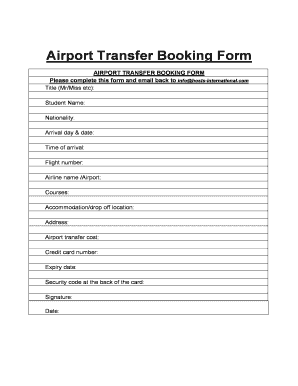
Get Airport Transfer Booking Form - Arts Ac
How it works
-

Open form follow the instructions
-

Easily sign the form with your finger
-

Send filled & signed form or save
How to fill out the Airport Transfer Booking Form - Arts Ac online
Filling out the Airport Transfer Booking Form - Arts Ac is an essential step to ensure your seamless airport transfer experience. This guide will provide you with clear instructions to help you easily complete the form online.
Follow the steps to complete your airport transfer booking form
- Click ‘Get Form’ button to obtain the form and open it in the editor.
- Title: Indicate your title, such as Mr or Miss. It allows the service providers to address you appropriately.
- Student name: Input your full name as you would like it to appear on your travel documents.
- Nationality: Specify your nationality to assist in the verification process and ensure compliance with any regulations.
- Arrival day & date: Enter the specific day and date of your arrival to facilitate the timing of your transfer.
- Time of arrival: Provide the exact time when your flight lands so that the transfer can be scheduled accordingly.
- Flight number: Include your flight number as listed on your ticket to help in identifying your travel schedule.
- Airline name /Airport: Specify your airline name and the airport of arrival to ensure proper coordination.
- Courses: If applicable, indicate the course you are enrolled in to assist in any additional arrangements.
- Accommodation/drop off location: Clearly state the address of your accommodation or the drop-off location for your convenience.
- Address: Provide the entire address for accurate navigation to your location.
- Airport transfer cost: Review and confirm the cost associated with the airport transfer service.
- Credit card number: Input your credit card details for the payment process, ensuring that the information is accurate.
- Expiry date: Enter the expiry date of your credit card to validate the payment.
- Security code at the back of the card: Provide the security code from the reverse side of your credit card as an additional security measure.
- Signature: Sign the form to authorize the payment and confirm your agreement to the provided terms.
- Date: Finally, enter the date on which you are filling out this form.
- Once all sections are complete, save your changes, and you may download, print, or share the form as necessary.
Complete your Airport Transfer Booking Form online today for a hassle-free travel experience.
It just makes sense to book your transfer in advance because you will need to pay for the service anyway regardless as to when you book it. The only thing is, it will be much cheaper to book in advance than it would be at the airport.