Loading
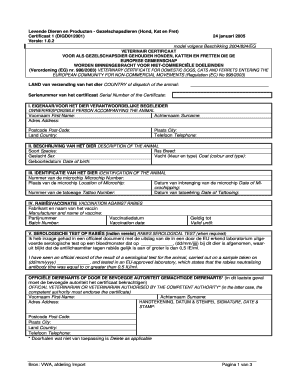
Get Certificaat 1 (digd012001) - Voedsel En Waren Autoriteit
How it works
-

Open form follow the instructions
-

Easily sign the form with your finger
-

Send filled & signed form or save
How to fill out the Certificaat 1 (DIGD012001) - Voedsel En Waren Autoriteit online
Filling out the Certificaat 1 (DIGD012001) form is essential for the transportation of domestic pets within the European Community for non-commercial purposes. This guide aims to assist users in completing the form accurately and efficiently online.
Follow the steps to complete the Certificaat 1 form online.
- Click ‘Get Form’ button to obtain the form and open it in the editor.
- Fill in the 'Country of dispatch of the animal' field with the name of the country from which the animal is being sent.
- Enter the 'Serial number of the certificate' in the designated field, which can usually be found within your official documentation.
- In section I, provide accurate details of the owner or responsible person accompanying the animal, including first name, surname, address, postcode, country, city, and telephone number.
- In section II, describe the animal by entering the species, breed, sex, coat color and type, and date of birth.
- In section III, provide the identification details for the animal, including the microchip number, location of the microchip, date of microchipping, tattoo number, and date of tattooing if applicable.
- For section IV, fill out the vaccination information including the manufacturer and name of the rabies vaccine, batch number, vaccination date, and validity until date.
- If required, complete section V regarding the rabies serological test with the relevant date and confirm that you have seen the official document stating the results.
- Complete sections VI and VII if treatments such as tick treatment or echinococcus treatment are required, including manufacturer details and veterinarian information.
- Ensure that the official veterinarian or authorized person signs and dates the certificate, and adds their stamp if required.
- Once all sections are filled, review the information for accuracy, then save changes, download, print, or share the form as needed.
Complete your documents online with confidence today!