Loading
Get After School Club Form
How it works
-

Open form follow the instructions
-

Easily sign the form with your finger
-

Send filled & signed form or save
How to fill out the After School Club Form online
This guide provides a step-by-step approach to filling out the After School Club Form online, ensuring a smooth and efficient process for users. With clear instructions, even those with limited experience can complete the form with ease.
Follow the steps to successfully complete your form online.
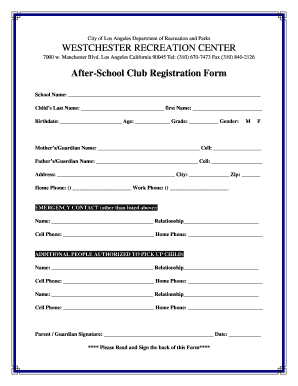
- Click the ‘Get Form’ button to obtain the After School Club Form and open it in your preferred online editor.
- Begin by filling out the School Name field with the official name of the school your child attends.
- Enter your child's last name and first name in the designated fields.
- Provide your child's birthdate, age, and current grade in the respective fields.
- Select your child's gender by marking the appropriate option.
- Complete the contact information for the mother or guardian, including their name and cell phone number.
- Fill in the father's or guardian's name and their cell phone number.
- Enter the home address, city, and zip code to ensure correct identification.
- Provide both home and work phone numbers for the guardians for additional contact options.
- List an emergency contact other than the guardians, including their relationship to the child and contact numbers.
- Identify additional people authorized to pick up your child by filling out their names and relationships with corresponding contact numbers.
- Sign and date the form to give consent, followed by reading and signing the Parent Consent Form on the back.
- In the Parent Consent Form, specify any known allergies your child has, and provide your signature and date.
- Review the payment information section and ensure you’re aware of the fees and payment deadlines.
- Finally, save your changes, download a copy of the form, print it for your records, or share it as needed.
Complete your After School Club Form online today to ensure your child's spot in the program.
Secure a Designated Space. ... Create a Business Plan. ... Build Curriculum. ... Hire Qualified Staff. ... Utilize Technology to Simplify Processes. ... Maintain a Safe and Secure Environment.