Loading
Get Ciy Camp Medical Release Form
How it works
-

Open form follow the instructions
-

Easily sign the form with your finger
-

Send filled & signed form or save
How to fill out the Ciy Camp Medical Release Form online
Completing the Ciy Camp Medical Release Form online is a straightforward process that ensures your participant's information is accurately captured. This guide will help you navigate each section of the form easily, ensuring a smooth experience for both you and the participant.
Follow the steps to successfully complete the form online.
- Press the ‘Get Form’ button to retrieve the Ciy Camp Medical Release Form and open it in your preferred online document editor.
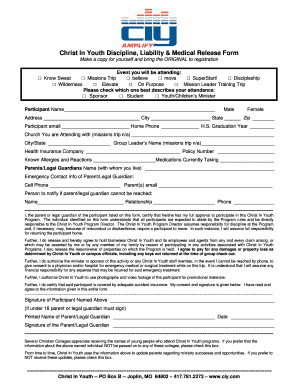
- Select the event you will be attending by checking the appropriate box. Options include Know Sweat, Missions Trip, believe, move, SuperStart!, Discipleship, Wilderness, Elevate, On Purpose, or Mission Leader Training Trip.
- Indicate your role in the program by checking the box that best describes your attendance: Sponsor, Student, or Youth/Children’s Minister.
- Fill in the Participant Name and complete the address fields, including City, State, and Zip Code.
- Provide the Participant Email and Home Phone number. Also, enter the High School Graduation Year.
- If applicable, indicate the church you are attending with (if attending a Missions Trip, this section may not apply).
- Complete the details about the Group Leader’s Name (if relevant) and the Health Insurance Company along with the Policy Number.
- List any known allergies and reactions, as well as any medications the participant is currently taking.
- Provide the name of the Parents/Legal Guardians with whom the participant lives along with their Emergency Contact Information, including Cell Phone and Email.
- Enter the name of the person to notify if the Parent/Legal Guardian cannot be reached, including their relationship to the participant and contact number.
- Review the section that requires the Parent or Legal Guardian to certify approval for participation. Ensure understanding of program rules and responsibilities.
- Make sure to review and agree to the release of claims, medical authorization, and use of photographs and videos.
- Provide the Signature of the Participant and, if under 18, ensure that the Parent/Legal Guardian's signature is included. Print their name and date the form.
- If you prefer, you may check the boxes to opt-out of sharing participant information with colleges or receiving updates.
- After completing all sections, save your changes, and choose to download, print, or share the completed form as needed.
Complete the Ciy Camp Medical Release Form online today for a hassle-free registration experience.
MOVE is a 5-day high school event designed to amplify the call of Christ on students lives to become #KingdomWorkers.