Loading
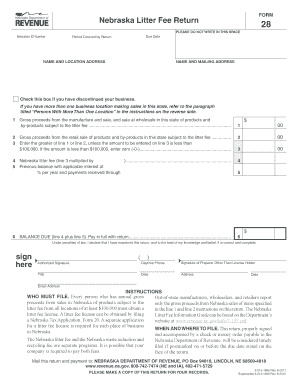
Get Form Nebraska Litter Fee Return - Nebraska Department Of Revenue
How it works
-

Open form follow the instructions
-

Easily sign the form with your finger
-

Send filled & signed form or save
How to fill out the FORM Nebraska Litter Fee Return - Nebraska Department Of Revenue online
Filling out the FORM Nebraska Litter Fee Return online is an essential task for businesses generating gross proceeds from sales in Nebraska. This guide provides a clear, step-by-step approach to assist users in accurately completing the form while ensuring compliance with state regulations.
Follow the steps to complete the Nebraska litter fee return online.
- Click ‘Get Form’ button to obtain the form and open it in your preferred digital platform.
- Fill in your Nebraska ID number in the designated field. This is crucial for identifying your business within the state's records.
- Indicate the period covered by your return by specifying the start and end dates. Ensure these dates reflect the correct reporting period.
- Provide your name and location address along with your mailing address. If the addresses are the same, you may indicate that to avoid repetition.
- Check the box if you have discontinued your business. This informs the Department of Revenue about your business status.
- For line 1, enter the gross proceeds from the manufacture and sale of products subject to the litter fee. Refer to the categories listed in the instructions for accuracy.
- For line 2, input the gross proceeds from retail sales of relevant products within Nebraska. Again, refer to the specific categories provided in the instructions.
- On line 3, enter the greater amount between lines 1 and 2, ensuring that it is not less than $100,000, otherwise input zero.
- Compute the Nebraska litter fee on line 4 by multiplying the amount entered on line 3 by the applicable fee rate. Round the amount as instructed.
- If there is a previous balance owed, enter the amount on line 5. This should include any interest or payments received.
- Calculate the balance due on line 6 by summing line 4 and line 5. Prepare a check or money order for this amount made out to the Nebraska Department of Revenue.
- Sign the return in the designated area to certify that the information provided is accurate and complete. If someone else prepared the return, they must also sign it.
- Save your completed form. You can now download, print, or share the document as needed, ensuring you have a copy for your records.
Be sure to complete your forms online to facilitate efficient processing and compliance.
Form 10-ID is required to filed only if a domestic company chooses to opt for concessional tax rate of 15% (plus applicable surcharge and cess) under Section 115BAB of the Income Tax Act, 1961. 4. How can I file and submit Form 10-ID? You can file form 10-ID through the online mode only (through the e-Filing portal).
Industry-leading security and compliance
US Legal Forms protects your data by complying with industry-specific security standards.
-
In businnes since 199725+ years providing professional legal documents.
-
Accredited businessGuarantees that a business meets BBB accreditation standards in the US and Canada.
-
Secured by BraintreeValidated Level 1 PCI DSS compliant payment gateway that accepts most major credit and debit card brands from across the globe.