Loading
Get Shelby County Schools Vendor Application - Mcsk12
How it works
-

Open form follow the instructions
-

Easily sign the form with your finger
-

Send filled & signed form or save
How to fill out the SHELBY COUNTY SCHOOLS VENDOR APPLICATION - Mcsk12 online
Filling out the Shelby County Schools Vendor Application online is a straightforward process that allows vendors to submit their information efficiently. This guide will provide you with a clear, step-by-step approach to ensure your application is completed accurately.
Follow the steps to complete your vendor application successfully.
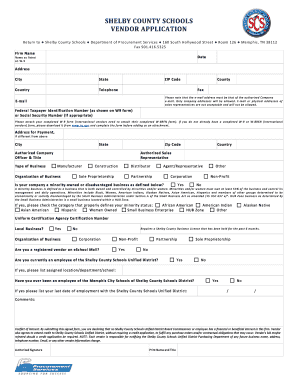
- Click ‘Get Form’ button to obtain the form and open it in the editor.
- Begin by entering your firm name in the designated field. Ensure this matches the legal name registered with your organization for its records.
- Fill in the date when you are completing the application. It is important to provide an accurate date for processing.
- Input the name as listed on your W-9 form. This ensures consistency with tax records.
- Provide your complete address, including city, state, country, and ZIP code. Make sure to double-check for accuracy.
- Enter your telephone number and fax number, if applicable, to ensure easy communication.
- Submit the authorized company email address. This must be a company email and not that of a sales representative.
- Fill in your Federal Taxpayer Identification Number as listed on your W-9 form or your Social Security Number if necessary.
- Attach your completed W-9 form or W-8BEN form for international vendors. Ensure all forms are filled out completely before attaching.
- Provide payment address if it differs from the main address. Fill in all required fields accurately.
- Specify the authorized company officer and their title, ensuring this corresponds with your company's structure.
- Indicate the type of business and check all applicable categories that describe your organization.
- If applicable, select whether your company qualifies as a minority-owned or disadvantaged business and specify the category.
- Confirm if you are a local business and have held a Shelby County business license for the past six months.
- Indicate whether you are a registered vendor on eSchool Mall and your current employment status with Shelby County Schools.
- In the comments section, provide any additional information that may be relevant to your application.
- Review the conflict of interest statement carefully and check the box to acknowledge agreement.
- Finally, provide your authorized signature, print your name, and indicate your title. This step completes your application.
- Once all fields are completed, save changes, download, print, or share the form as needed.
Complete your vendor application online today to ensure a smooth onboarding process with Shelby County Schools.
Menu Name & TitleDepartment/DivisionKevin Malone DirectorSchool OperationsLee Brother Compliance AdvisorSchool OperationsLelia Causey Compliance AdvisorSchool OperationsNancy Roll Parent LiaisonSchool Operations12 more rows