Loading
Get Hinson Management
How it works
-

Open form follow the instructions
-

Easily sign the form with your finger
-

Send filled & signed form or save
How to fill out the Hinson Management online
This guide provides clear instructions on how to complete the Hinson Management form. Follow the steps below to ensure your submission meets all requirements efficiently.
Follow the steps to fill out your Hinson Management form correctly.
- Click ‘Get Form’ button to access the Hinson Management document and open it in your editor.
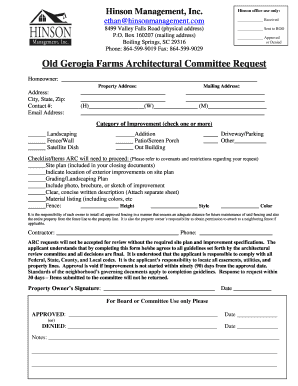
- Fill in the homeowner's name, property address, and mailing address in the designated fields.
- Provide your contact numbers, including home, work, and mobile, as well as your email address in the respective sections.
- Select the category or categories of improvement you are requesting by checking the appropriate boxes. Options include landscaping, fence/wall, satellite dish, addition, patio/screen porch, outbuilding, driveway/parking, or other.
- Prepare a checklist of items that the Architectural Review Committee (ARC) will need to proceed, referencing the community's covenants and restrictions.
- Attach necessary documents such as a site plan, grading/landscaping plan, photos, or sketches of the improvement, alongside a clear written description.
- For fence requests, complete additional details regarding height, style, and color in the specified areas. Remember that responsibility for installation and maintenance lies with the owner.
- Provide your contractor's name and phone number in the area provided.
- Review your completed form to ensure accuracy. Sign and date the form to confirm your understanding and agreement with the guidelines set forth by the ARC.
- Submit your completed form by saving the changes and utilizing available options to download, print, or share the document.
Begin filling out your Hinson Management form online today.
Industry-leading security and compliance
US Legal Forms protects your data by complying with industry-specific security standards.
-
In businnes since 199725+ years providing professional legal documents.
-
Accredited businessGuarantees that a business meets BBB accreditation standards in the US and Canada.
-
Secured by BraintreeValidated Level 1 PCI DSS compliant payment gateway that accepts most major credit and debit card brands from across the globe.