Loading
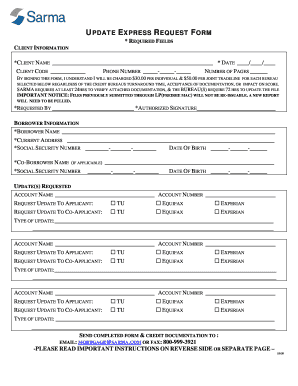
Get Update Express Request Form - Sarma
How it works
-

Open form follow the instructions
-

Easily sign the form with your finger
-

Send filled & signed form or save
How to fill out the UPDATE EXPRESS REQUEST FORM - Sarma online
This guide provides step-by-step instructions for completing the Update Express Request Form - Sarma online. By following these instructions, you will ensure that your request is filled out accurately and submitted without delays.
Follow the steps to complete your request form online.
- Press the ‘Get Form’ button to access the Update Express Request Form and open it in your preferred editor.
- Begin filling out the client information section. You will need to provide your name, date, client code, phone number, and the number of pages being submitted. Ensure all required fields are accurately filled out.
- In the 'requested by' field, enter the name of the individual requesting the updates, and provide your authorized signature in the designated section.
- Next, move to the borrower information section. Input the borrower’s name, current address, social security number, and date of birth. If applicable, also fill in the co-borrower’s information.
- Proceed to the updates requested section. For each account, specify the account name and account number. Identify which credit bureaus you would like to request updates for both the applicant and co-applicant by checking the appropriate boxes.
- Indicate the type of update required for each account. Provide detailed descriptions of the requested modifications or corrections.
- After completing all sections, review the entire form to confirm that all required fields have been filled out correctly. Missing information may delay your request.
- Once you are satisfied with the completed form, save your changes and download it for submission.
- Finally, email the form and all accompanying documentation to mortgage@sarma.com or fax it to 800-999-3921 as instructed.
Complete your Update Express Request Form online today to ensure a prompt processing of your request.