Loading
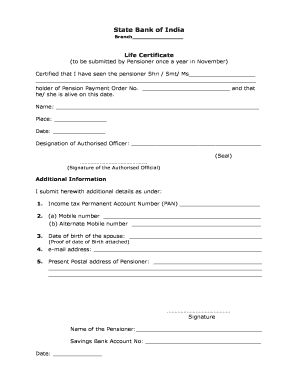
Get Life Certificate - Onlinesbi
How it works
-

Open form follow the instructions
-

Easily sign the form with your finger
-

Send filled & signed form or save
How to fill out the Life Certificate - OnlineSBI online
Filling out the Life Certificate for OnlineSBI is an essential annual requirement for pensioners to confirm their status. This guide will walk you through the process step-by-step, ensuring that you complete the form accurately and efficiently.
Follow the steps to fill out the Life Certificate with ease
- Press the ‘Get Form’ button to access the Life Certificate form and open it in your document editor.
- Begin by providing the name of the pensioner in the designated field. Ensure accuracy when entering the full name of the individual being certified.
- Next, locate the Pension Payment Order number section. Enter the unique identifier as per the pension documents to confirm the individual's pension account.
- In the 'certification' area, an authorized officer must confirm the pensioner's status. This officer will fill in their name, designation, and add a signature, along with the official seal in designated spaces.
- Proceed to the additional information section. Fill out the Income Tax Permanent Account Number (PAN) accurately for identification purposes.
- Enter the mobile number and an alternate mobile number in the specified fields to ensure that the pensioner can be reached easily.
- Provide the date of birth of the spouse, along with attached proof of the date of birth.
- Fill in the email address, ensuring it is current and accessible for communication.
- Lastly, complete the present postal address of the pensioner, ensuring all details are correct and up to date.
- After all sections are filled, add the pensioner's name and savings bank account number in the designated fields. Finally, sign and date the form at the bottom.
- Once you have filled out all required fields, you can save your changes, download the document, print it, or share it as necessary.
Complete your Life Certificate online today to meet your annual requirements with ease.
It can be downloaded from the 'Download' tab from https://jeevanpramaan.gov.in portal.