Loading
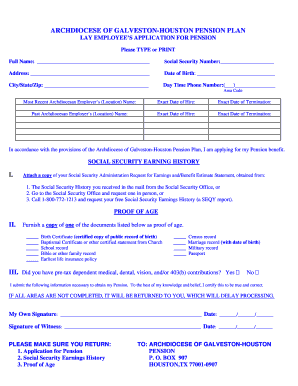
Get Application For Pension - Archdiocese Of Galveston-houston - Archgh
How it works
-

Open form follow the instructions
-

Easily sign the form with your finger
-

Send filled & signed form or save
How to fill out the Application For Pension - Archdiocese Of Galveston-Houston - Archgh online
Filling out the Application For Pension from the Archdiocese of Galveston-Houston can seem daunting, but with clear instructions, you can complete it efficiently. This guide will walk you through each section of the form to ensure you provide the necessary information accurately.
Follow the steps to successfully complete your application online.
- Select the ‘Get Form’ button to access the pension application form and open it in your editing tool.
- Begin by typing or printing your full name in the designated field without abbreviations. Ensure clarity for accurate processing.
- Enter your Social Security Number in the provided space. Double-check for accuracy, as this is a crucial identifier.
- Fill in your current address, including street, city, state, and zip code. Make sure this reflects your most recent residence.
- Provide your date of birth in the specified format, ensuring it is correct to establish eligibility for pension benefits.
- Input your daytime phone number, including the area code, so that you can be contacted if there are any issues or questions.
- List your most recent Archdiocesan employer's name and location, followed by the exact dates of your hiring and termination with that employer.
- Repeat the previous step for any past Archdiocesan employers, ensuring you provide accurate dates for both hiring and termination.
- In the section regarding your Social Security earning history, attach a copy of the required document from the Social Security Administration, following the listed options for obtaining this information.
- For the proof of age section, check one of the provided documents you will furnish and ensure it meets the criteria listed.
- Indicate whether you had any pre-tax dependent medical, dental, vision, and/or 403(b) contributions by selecting 'Yes' or 'No.'
- Review the statement affirming that all provided information is true to the best of your knowledge, and then sign and date the application in the specified fields.
- Ensure that a witness signs and dates the application as well, as this is a requirement before submission.
- Finally, compile the completed application, your Social Security earnings history, and proof of age documents for submission.
- Submit all documents to: Archdiocese of Galveston-Houston, Pension, P. O. Box 907, Houston, TX 77001-0907.
Take the next step and complete your pension application online today.
The pension plan benefit does not receive a cost of living adjustment. Does my balance roll over from year to year? Any unused funds will roll over annually and will be available to you for future healthcare expenses. You do not have to spend down your balance in any single plan year.
Industry-leading security and compliance
US Legal Forms protects your data by complying with industry-specific security standards.
-
In businnes since 199725+ years providing professional legal documents.
-
Accredited businessGuarantees that a business meets BBB accreditation standards in the US and Canada.
-
Secured by BraintreeValidated Level 1 PCI DSS compliant payment gateway that accepts most major credit and debit card brands from across the globe.