Loading
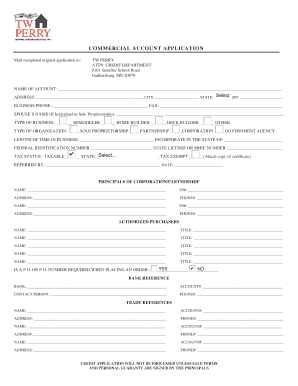
Get Commercial Account Application - Tw Perry
How it works
-

Open form follow the instructions
-

Easily sign the form with your finger
-

Send filled & signed form or save
How to fill out the COMMERCIAL ACCOUNT APPLICATION - TW Perry online
Filling out the COMMERCIAL ACCOUNT APPLICATION for TW Perry is an essential step for establishing a business account. This guide provides clear, step-by-step instructions to assist you in completing the application online with ease.
Follow the steps to successfully complete your application.
- Press the ‘Get Form’ button to access the COMMERCIAL ACCOUNT APPLICATION. This will allow you to open the form in your preferred online editor.
- Provide the name of the account in the designated field, ensuring accurate spelling and full representation.
- Fill in the postal ZIP code and complete the address fields with your business’s physical location, including city and state.
- Enter your business phone number and fax number, if applicable, ensuring the numbers are correct for effective communication.
- If applicable, include your spouse’s name if you are applying as an individual or sole proprietorship.
- Select the type of business from the options provided, marking all that apply—remodeler, home builder, deck builder, or other.
- Choose your organization type: sole proprietorship, partnership, corporation, or government agency.
- Indicate the length of time your business has been operating and where it was incorporated.
- Provide your federal identification number and state license or MHIC number, if applicable.
- Choose your tax status as either taxable or tax-exempt and fill in the necessary details.
- List any referrals, if applicable, and the corresponding date.
- Complete the principals of the corporation or partnership section, entering their names, Social Security numbers, addresses, and phone numbers.
- Detail authorized purchasers by entering their names and titles.
- If necessary, answer whether a purchase order number is required when placing an order.
- Fill out bank reference details including the bank name, account number, contact person, and their phone number.
- Provide trade references including names, account numbers, addresses, and phone numbers.
- Review all provided information for accuracy, ensuring compliance with the terms and conditions stated.
- Once the application is fully completed, save your changes, and choose to download, print, or share your form as needed.
Complete your COMMERCIAL ACCOUNT APPLICATION online today and streamline the process of establishing your account.
Answer: Please call 240-364-0274 or 240-364-0413, fax 240-403-2233 or email us at Credit@twperry.com.