Loading
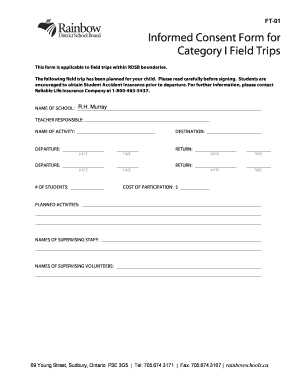
Get Field Trip Permission Form - Rainbow District School Board
How it works
-

Open form follow the instructions
-

Easily sign the form with your finger
-

Send filled & signed form or save
How to fill out the Field Trip Permission Form - Rainbow District School Board online
Filling out the Field Trip Permission Form for the Rainbow District School Board online is a straightforward process designed to ensure the safety and participation of students during school excursions. This guide will provide you with detailed, step-by-step instructions to complete the form effectively.
Follow the steps to fill out the form online:
- Click ‘Get Form’ button to obtain the form and open it in the editor.
- Begin by entering the 'Name of School,' ensuring the correct name is indicated for accurate processing.
- Next, fill in the 'Teacher Responsible' section with the name of the teacher overseeing the field trip.
- Complete the 'Name of Activity' field to specify the nature of the field trip planned.
- Provide the 'Destination' of the trip, including any specific locations associated with the outing.
- Indicate the 'Departure' and 'Return' dates and times. Use the specified format for clarity.
- Fill in the estimated 'Number of Students' participating in the field trip.
- Record the 'Cost of Participation' to inform users of any fees related to the trip.
- Detail the 'Planned Activities' for the trip, providing a brief overview of the itinerary.
- List the 'Names of Supervising Staff' and 'Names of Supervising Volunteers' to identify who will be present with students during the trip.
- Select the type of transportation arrangement by checking the appropriate box and providing details if necessary.
- In the 'Medical Concerns' section, provide any relevant information regarding your child's health needs.
- Record your child's health card number in the designated area.
- Complete the emergency contact information, including a name and telephone number.
- Finally, review everything for accuracy, sign the form with your name and date, and ensure the teacher and principal/vice-principal sign as well.
- Once finished, save changes, and consider downloading, printing, or sharing the completed form as needed.
Complete your Field Trip Permission Form online today to ensure your child's participation!
When creating online permission slips, there are a few items you should include and request: Add details about the event, including date, departure, return time, location, price, mode of transportation, and a brief description of what the child should expect on the trip as well as ways to help them prepare.