Loading
Get Merchandise Request Form - Athletic Virginia
How it works
-

Open form follow the instructions
-

Easily sign the form with your finger
-

Send filled & signed form or save
How to fill out the Merchandise Request Form - Athletic Virginia online
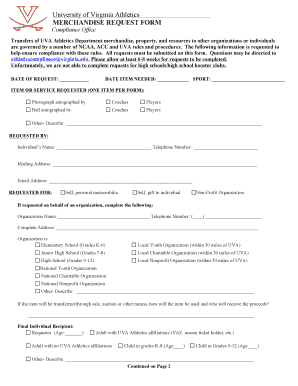
This guide provides users with a thorough walkthrough on completing the Merchandise Request Form for Athletic Virginia online. It aims to simplify the process, ensuring compliance with regulations while supporting your request for UVA Athletics merchandise.
Follow the steps to effectively complete the form online.
- Click the ‘Get Form’ button to access the Merchandise Request Form and open it in your preferred document editor.
- In the first section, input the 'date of request' and the 'date item needed' to establish timelines for your request. Ensure both are filled out accurately.
- Select the sport associated with your request from the available options. This information helps categorize your request appropriately.
- In the 'item or service requested' section, specify the item you are requesting, noting that only one item can be requested per form. If you are requesting an autograph, indicate whether it is from coaches or players, or provide details for 'other' items.
- Fill out the 'requested by' section with your full name, telephone number, mailing address, and email address to ensure that the Athletics Compliance Office can contact you regarding your request.
- Indicate whether the request is for personal memorabilia, a gift, or on behalf of a non-profit organization. If on behalf of an organization, provide the organization’s name and relevant contact details.
- Specify the type of organization if applicable, selecting from the provided categories such as 'elementary school', 'local youth organization', etc.
- If the item will be sold, auctioned, or transferred in another manner, describe how it will be used and who will receive the proceeds.
- Next, indicate final recipient details, including their age and relationship to UVA Athletics if applicable, ensuring accurate classification of the recipient.
- Read the NCAA Bylaw 12.5 Promotional Activities statement carefully. After understanding the regulations, sign and date the form where indicated to affirm compliance.
- If required, provide space for the coach’s signature and compliance office approval, which is essential for the processing of your request.
- Once all sections are completed, review your entries for accuracy. You can then save the changes, download, print, or share the filled-out form as needed.
Complete your Merchandise Request Form online today and ensure your request is submitted efficiently.
Related links form
Industry-leading security and compliance
US Legal Forms protects your data by complying with industry-specific security standards.
-
In businnes since 199725+ years providing professional legal documents.
-
Accredited businessGuarantees that a business meets BBB accreditation standards in the US and Canada.
-
Secured by BraintreeValidated Level 1 PCI DSS compliant payment gateway that accepts most major credit and debit card brands from across the globe.