Loading
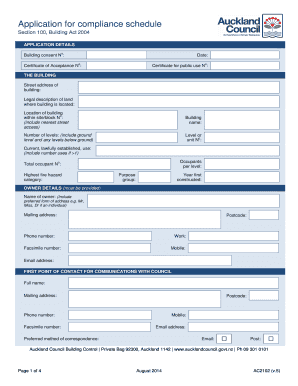
Get Ac2102 Application For Compliance Schedule - Auckland Council - Aucklandcouncil Govt
How it works
-

Open form follow the instructions
-

Easily sign the form with your finger
-

Send filled & signed form or save
How to fill out the AC2102 Application For Compliance Schedule - Auckland Council - Aucklandcouncil Govt online
The AC2102 Application For Compliance Schedule is a crucial document for ensuring that building compliance with safety and regulatory standards is maintained. This guide will provide you with a step-by-step approach to filling out this application online, making the process clear and manageable for all users.
Follow the steps to complete your application efficiently.
- Click ‘Get Form’ button to access the form online.
- Begin filling out the APPLICATION DETAILS section. Provide the building consent number and the date. If applicable, include the certificate of acceptance number and the certificate for public use number.
- In the THE BUILDING section, fill in the street address of the building and legal description of the land. Specify the location within the site/block, including the nearest street access.
- Complete the building information by including the building name, number of levels, the current lawful use of the building, and the total number of occupants per level.
- In the OWNER DETAILS section, provide the owner's name, mailing address, postcode, phone number, facsimile number, mobile, and email address.
- Identify the FIRST POINT OF CONTACT FOR COMMUNICATIONS WITH COUNCIL. Fill in their full name, mailing address, postcode, phone number, facsimile number, mobile, email address, and preferred method of correspondence.
- Proceed to the COMPLIANCE SCHEDULE INSPECTION, MAINTENANCE AND REPORTING PROCEDURES section. List the applicable systems present in the building along with their corresponding inspection, maintenance, and reporting standards.
- In the LOCATION OF COMPLIANCE SCHEDULE section, specify where the compliance schedule will be kept as agreed with Auckland Council.
- Fill out the BILLING information, including the owner and the preferred method of correspondence for invoices and refunds.
- Finally, complete the SIGNATORY section where the owner's or agent's signature is required. Include the date and print the name of the signatory.
- Once all sections are completed, review the application for accuracy before saving your changes. You can then download, print, or share the form as necessary.
Complete your AC2102 Application for Compliance Schedule online to ensure your building meets all compliance requirements.
Get form
Experience a faster way to fill out and sign forms on the web. Access the most extensive library of templates available.
A building owner needs to renew a building's warrant of fitness (BWoF) every 12 months, signing, issuing and publicly displaying it to prove the building's life safety systems (called specified systems) have been maintained and inspected.
Get This Form Now!
Use professional pre-built templates to fill in and sign documents online faster. Get access to thousands of forms.
Industry-leading security and compliance
US Legal Forms protects your data by complying with industry-specific security standards.
-
In businnes since 199725+ years providing professional legal documents.
-
Accredited businessGuarantees that a business meets BBB accreditation standards in the US and Canada.
-
Secured by BraintreeValidated Level 1 PCI DSS compliant payment gateway that accepts most major credit and debit card brands from across the globe.