Loading
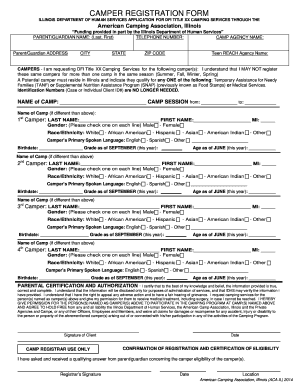
Get Camper Registration Form - (aca) Illinois Section - Acail
How it works
-

Open form follow the instructions
-

Easily sign the form with your finger
-

Send filled & signed form or save
How to fill out the CAMPER REGISTRATION FORM - (ACA) Illinois Section - Acail online
This guide provides a comprehensive overview of how to successfully complete the CAMPER REGISTRATION FORM for the American Camping Association in Illinois. By following the steps outlined below, users can ensure that they provide all necessary information to register campers for the upcoming camping services.
Follow the steps to complete the registration form with ease.
- Click 'Get Form' button to obtain the form and open it in the editor.
- Enter the parent/guardian's full name in the designated field. Include the last name followed by the first name for accurate identification.
- Provide a valid telephone number in the field provided for easy communication.
- Include the name of the camp agency in the next available field to ensure proper affiliation.
- Fill in the complete address of the parent/guardian, including street address, city, state, and ZIP code, in the respective sections.
- Indicate the Teen REACH Agency Name, if applicable, to facilitate further support.
- List the campers for whom you are requesting DFI Title XX Camping Services. Ensure that the campers’ eligibility is confirmed beforehand as registration for the same camper across multiple camps is not allowed.
- For each camper, fill out their last name, first name, and middle initial, ensuring accuracy to avoid any issues during registration.
- Select the camper's gender by checking the appropriate box for male or female.
- Choose the camper's race/ethnicity from the listed options to support demographic tracking in the program.
- Indicate the camper's primary spoken language by selecting the appropriate option from the list provided.
- Enter the camper's birthdate, grade as of September, and age as of June in their respective fields to complete their profile.
- If registering additional campers, repeat steps 8 to 12 for each camper needed.
- Read and complete the parental certification and authorization section, ensuring all information is true and accurate.
- Sign the document to authorize the camping services and provide consent for medical treatment if necessary.
- Finally, save the changes made to the form, download it, print it, or share it as needed to finalize your registration.
Complete your camper registration form online today to secure a spot for your camper this season.