Loading
Get Exemption-form-air-show-en - Nav Canada
How it works
-

Open form follow the instructions
-

Easily sign the form with your finger
-

Send filled & signed form or save
How to fill out the Exemption-Form-Air-Show-EN - Nav Canada online
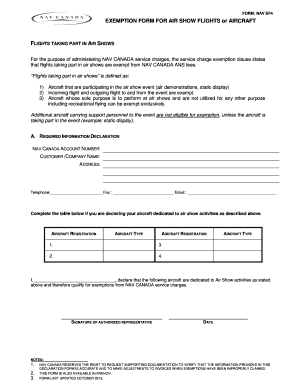
Filling out the Exemption-Form-Air-Show-EN - Nav Canada correctly is essential for securing service charge exemptions for air show flights. This guide provides clear, step-by-step instructions to help users of all experience levels complete the form accurately online.
Follow the steps to fill out the exemption form correctly.
- Press the ‘Get Form’ button to access the Exemption-Form-Air-Show-EN. This will open the form in a digital platform where you can fill it out conveniently.
- Begin by entering your NAV Canada account number in the designated field at the top of the form. This number is important for identifying your account.
- Next, input your customer or company name along with the address details in the required sections. Ensure all information is accurate to facilitate processing.
- Provide your contact details, including telephone number, fax number, and email address. This will be used for any communication regarding your exemption request.
- Complete the aircraft declaration table. List each aircraft dedicated to air show activities, including the registration number and type for all relevant entries.
- In the declaration section, sign and date the form. This signature confirms that you declare the information provided is accurate and true.
- If you are seeking exemption for specific flights, complete the additional flight details table, including date, UTC, flight ID, aircraft registration, departure, and destination.
- Review all entered information carefully for accuracy. Make any necessary corrections before finalizing.
- Once completed, you can save your changes, download the form, print it for your records, or share it as needed.
Take the time to complete the Exemption-Form-Air-Show-EN online today and secure your necessary exemptions for air show activities.
24/7 telephone access for flight operations personnel Through our flight information centres (FIC), NAV CANADA can provide interpretive weather briefings, advisory services and flight plan filing by telephone. Within Canada, call 1-866-WX-BRIEF to reach your FIC.
Industry-leading security and compliance
US Legal Forms protects your data by complying with industry-specific security standards.
-
In businnes since 199725+ years providing professional legal documents.
-
Accredited businessGuarantees that a business meets BBB accreditation standards in the US and Canada.
-
Secured by BraintreeValidated Level 1 PCI DSS compliant payment gateway that accepts most major credit and debit card brands from across the globe.