Loading
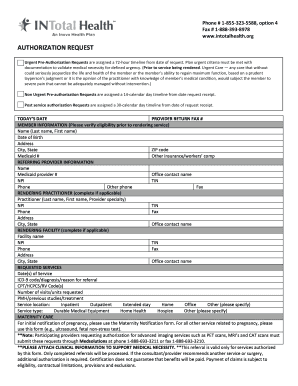
Get Pre-authorization Request Form - Intotal Health
How it works
-

Open form follow the instructions
-

Easily sign the form with your finger
-

Send filled & signed form or save
How to fill out the Pre-Authorization Request Form - INTotal Health online
Filling out the Pre-Authorization Request Form is an essential step in ensuring timely access to necessary medical services. This guide provides a clear, step-by-step approach to completing the form online, helping you navigate each section effectively.
Follow the steps to fill out the form accurately.
- Press the ‘Get Form’ button to obtain the form and open it in the editor.
- Enter today’s date in the designated field to document when the request is being submitted.
- Fill in the provider return fax number to ensure that the information can be correctly routed back to your office.
- Complete the member information section by including the person's full name, date of birth, address, city, state, ZIP code, Medicaid number, and any other insurance or workers' compensation details.
- Provide referring provider information including their name, Medicaid provider number, office contact name, NPI, TIN, phone number, and an alternative phone number.
- If applicable, fill out the rendering practitioner section which includes their last name, first name, provider specialty, NPI, TIN, phone, fax, address, city, state, and office contact name.
- Complete the rendering facility section if needed, including the facility name, NPI, TIN, phone, fax, address, city, state, and office contact name.
- List the requested services by entering the date(s) of service, ICD-9 code/diagnosis/reason for referral, CPT/HCPCS/RV code(s), and the number of visits/units requested.
- Provide any previous medical history, studies, or treatments in the PMH section.
- Specify the service location as either inpatient, outpatient, extended stay, home, office, or other.
- Indicate the service type as durable medical equipment, home health, hospice, or other, if applicable.
- For maternity care, note whether this is an initial notification of pregnancy or related services, ensuring to use the correct forms as needed.
- Attach any necessary clinical information to support the medical necessity for the services requested.
- Once the form is completed, save changes, download for your records, print, or share it as required.
Take action now by completing your Pre-Authorization Request Form online to facilitate timely healthcare support.
To file a claim, you must submit a Medi-Cal Claim Form for Beneficiary Reimbursement. The claim form must be filled out in blue or black ink; • The claim form must have an original signature (no copies will be accepted); The Claim Form must include: • A photo copy of your Medi-Cal Beneficiary Identification Card (BIC).