Loading
Get Owner Claim Submittal Form - First American
How it works
-

Open form follow the instructions
-

Easily sign the form with your finger
-

Send filled & signed form or save
How to fill out the OWNER CLAIM SUBMITTAL FORM - First American online
This guide provides a clear and comprehensive overview of how to complete the Owner Claim Submittal Form from First American online. Whether you are a first-time user or need a refresher, the following steps will assist you in accurately submitting your claim.
Follow the steps to fill out the Owner Claim Submittal Form online.
- Press the 'Get Form' button to retrieve the form and open it in your editor.
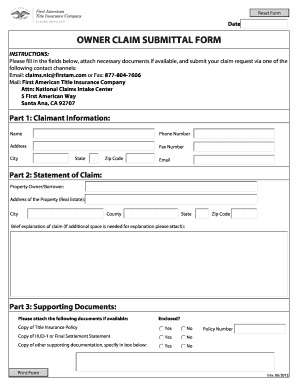
- In Part 1: Claimant Information, provide your name, phone number, and address. Ensure accuracy to avoid delays in processing your claim. Include your fax number, city, state, zip code, and email address.
- Move to Part 2: Statement of Claim. Here, input the property owner's name and the address of the property in question. Be diligent to include the city, county, state, and zip code of the property.
- Provide a brief explanation of your claim. If you require more space, attach additional documentation to your submission.
- In Part 3: Supporting Documents, check the boxes to indicate whether you have attached the necessary documents, including a copy of the title insurance policy and a copy of the HUD-1 or final settlement statement. Specify any additional documents in the space provided.
- Finally, review all your entries for accuracy. Once you are satisfied with the information you've entered, save your changes, and prepare to download, print, or share the form as required.
Complete your documents online and submit your claim today.
Any state that requires an insurer to pay a claim within a certain time period after satisfactory proof of loss or other such standard, can create a problem for title insurers. The option to cure the defect in a title is likely to take more than thirty days, oftentimes more than sixty days.