Loading
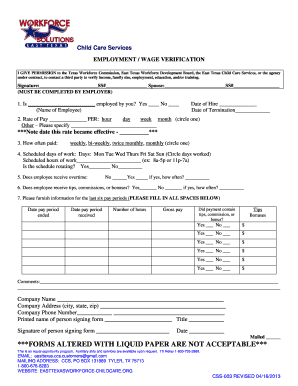
Get Employment/wage Verification - Child Care Assistance - Easttexasworkforce-childcare
How it works
-

Open form follow the instructions
-

Easily sign the form with your finger
-

Send filled & signed form or save
How to fill out the Employment/Wage Verification - Child Care Assistance - Easttexasworkforce-childcare online
Filling out the Employment/Wage Verification form is essential for verifying your employment and wage details to qualify for child care assistance. This guide provides clear, step-by-step instructions to help you complete the form accurately and efficiently.
Follow the steps to complete the Employment/Wage Verification form online.
- Click ‘Get Form’ button to obtain the form and open it in the editor.
- Begin by providing the permission statement where you authorize the Texas Workforce Commission and related agencies to contact third parties for income verification. Ensure this section is completed as it is important for compliance.
- In the designated area, fill in the name of the employee being verified, and confirm their employment status by selecting either 'Yes' or 'No'.
- Enter the date of hire and the date of termination if applicable. This information is critical for understanding the employee’s duration of employment.
- Indicate the rate of pay by filling in the specific amount and circling the appropriate payment frequency (hour, day, week, month, or other). Also, note the effective date of this pay rate.
- Specify the frequency of pay (weekly, bi-weekly, twice monthly, monthly) by circling your choice.
- List the scheduled working days by circling the applicable days of the week and providing the scheduled working hours (e.g., 8a-5p) in the respective field.
- Indicate whether the employee’s schedule is rotating by selecting 'Yes' or 'No'.
- State if the employee receives overtime by selecting the corresponding option. If yes, specify how often they receive it.
- Answer if the employee receives tips, commissions, or bonuses, and if applicable, indicate the frequency of such payments.
- Provide detailed information for the last six pay periods. Fill in each space for the date the pay period ended, date received, hours worked, gross pay, and whether payment contained tips or bonuses.
- Complete the comments section if you have any additional information to provide.
- Fill out the company name, address, and phone number accurately to ensure the form is processed correctly.
- The individual completing the form must print their name, title, and sign it, along with the date of completion. Ensure all sections are properly filled out as forms altered with liquid paper are not acceptable.
- Once you have filled out the entire form, you can save changes, download, print, or share it as needed.
Begin the process now by completing your Employment/Wage Verification form online.
If you're planning to start a daycare operation in the state of Texas, you'll need to acquire the appropriate license for the type of business you want to create. Texas child care licensing is administered by the Child Care Licensing (CCL) Division of the Texas Department of Health and Human Services (HHS).
Industry-leading security and compliance
US Legal Forms protects your data by complying with industry-specific security standards.
-
In businnes since 199725+ years providing professional legal documents.
-
Accredited businessGuarantees that a business meets BBB accreditation standards in the US and Canada.
-
Secured by BraintreeValidated Level 1 PCI DSS compliant payment gateway that accepts most major credit and debit card brands from across the globe.