Loading
Get Pcb Order Form.pdf - Ece - Ece Umd
How it works
-

Open form follow the instructions
-

Easily sign the form with your finger
-

Send filled & signed form or save
How to fill out the PCB ORDER FORM.pdf - ECE - Ece Umd online
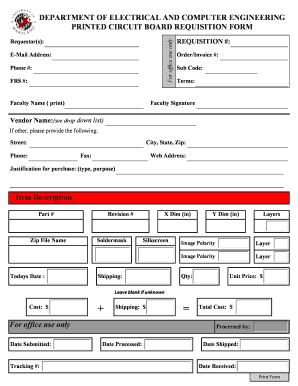
This guide provides detailed instructions on how to effectively fill out the PCB ORDER FORM.pdf for the Department of Electrical and Computer Engineering. By following these steps, users can ensure a smooth submission process for their requests.
Follow the steps to accurately complete your PCB order form.
- Press the ‘Get Form’ button to download the PCB ORDER FORM.pdf and open it in the designated editor.
- Complete the 'Requestor(s)' section by entering your name, email address, and phone number. This information is essential for communication regarding your order.
- Fill in the 'FRS #' and 'Faculty Name.' Ensure you print your faculty's name clearly as this helps with verification in the department.
- Enter the 'Requisition #', 'Order/Invoice #', and 'Sub Code' if applicable. If you are unsure about these, you may leave them blank.
- Provide the terms of the purchase, followed by the 'Faculty Signature.' This confirms your authorization for the request.
- Choose the vendor name from the dropdown list. If your vendor is not listed, select 'other' and fill in the required details, including street address, city, state, zip code, phone, fax, and web address.
- Justify your purchase by typing a brief explanation of the purpose of the order in the justification section.
- For each item you wish to order, fill in the 'Item Description,' 'Part #', and 'Zip File Name.' Specify the 'X Dim (in)', 'Y Dim (in)', and the number of 'Layers' as needed.
- Indicate the 'Image Polarity' for each layer. Ensure accuracy to avoid any production errors.
- Enter the total quantity and unit price for each item. If you are unsure of the unit price, leave it blank. The form will calculate costs based on your entries.
- Include the shipping cost and ensure the 'Total Cost' is computed correctly before submission.
- After completing the form, save your changes. You can then download, print, or share the completed form as necessary.
Complete your PCB order form online now to streamline your requisition process.
Industry-leading security and compliance
US Legal Forms protects your data by complying with industry-specific security standards.
-
In businnes since 199725+ years providing professional legal documents.
-
Accredited businessGuarantees that a business meets BBB accreditation standards in the US and Canada.
-
Secured by BraintreeValidated Level 1 PCI DSS compliant payment gateway that accepts most major credit and debit card brands from across the globe.