Loading
Get Mcps Form 440 35
How it works
-

Open form follow the instructions
-

Easily sign the form with your finger
-

Send filled & signed form or save
How to fill out the Mcps Form 440 35 online
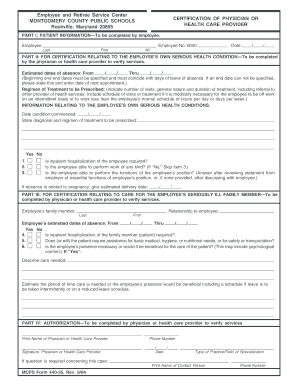
This guide will assist you in accurately completing the Mcps Form 440 35 online, which is essential for certifying health conditions pertaining to employees. Follow the outlined steps to ensure a smooth submission process.
Follow the steps to complete the Mcps Form 440 35 efficiently.
- Click the ‘Get Form’ button to access the form and open it in your online editing tool.
- Begin by filling out Part I, which includes the patient information. Provide details such as the employee's last name, first name, middle initial, and employee number. Ensure you enter the date in the format required.
- Proceed to Part II for the certification relating to the employee's own serious health condition. The physician or healthcare provider should specify the estimated dates of absence, ensuring they align with the leave period. Include treatment details such as the number of visits and the general nature of the regimen prescribed.
- In this section, indicate any necessary information about the employee's health condition, including the date the condition started, diagnosis, and whether hospitalization is required. Clearly state if the employee is able to perform their job functions after considering essential functions outlined by the employer.
- If applicable, provide details about the estimated delivery date if the absence is related to pregnancy.
- Move to Part III, which pertains to care for a seriously ill family member. The healthcare provider should include the relationship of the employee to the family member, along with the estimated absence dates.
- Answer the questions about the family member's medical needs, indicating if hospitalization is necessary, and whether assistance is required for basic needs. Highlight the importance of the employee’s presence for the patient’s care.
- Finish with Part IV, which requires the physician or healthcare provider's authorization. Enter the printed name, phone number, signature, and the date. Specify the type of practice or field of specialization.
- Review all entries for accuracy, and utilize the options available to save changes. You may then download, print, or share the completed form as needed.
Complete your Mcps Form 440 35 online today to ensure timely processing of your health certification.
For more information, please contact the Technical Help Desk at 301-517-5800.