Loading
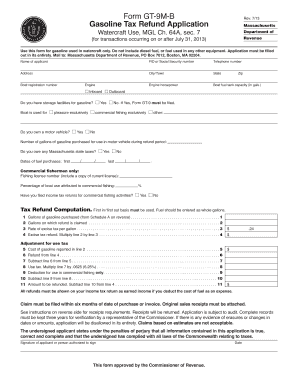
Get Form Gt-9m-b Gasoline Tax Refund Application - Mass.gov - Mass
How it works
-

Open form follow the instructions
-

Easily sign the form with your finger
-

Send filled & signed form or save
How to fill out the Form GT-9M-B Gasoline Tax Refund Application - Mass.Gov - Mass online
Filling out the Form GT-9M-B for gasoline tax refund can be straightforward if you follow the right steps. This comprehensive guide will provide you with expert insights and detailed guidance to ensure your application is completed accurately.
Follow the steps to successfully complete the gasoline tax refund application.
- Use the ‘Get Form’ button to access the form and open it in your preferred editor.
- Begin by entering your name in the designated field. This field is mandatory and must reflect the individual or entity applying for the refund.
- Provide your Federal Identification Number (FID) or Social Security number. This will help identify your application and process your refund efficiently.
- Fill in your telephone number to ensure that the Department of Revenue can reach you if needed.
- Input your complete address, including city or town, state, and zip code. Accurate information is essential for processing your application.
- Indicate the engine horsepower of your boat and its fuel tank capacity in gallons. This information is required for proper refund calculations.
- Enter your boat registration number. This is necessary for the legitimacy of your application.
- Select the type of engine you have: inboard or outboard. Indicate whether you have storage facilities for gasoline.
- Specify the primary use of your boat. You can choose between pleasure, commercial fishing, or other uses. If you choose commercial fishing, additional questions will be presented.
- If applicable, report the number of gallons of gasoline purchased for use in a motor vehicle during the refund period.
- Indicate whether you owe any Massachusetts state taxes by selecting yes or no.
- Fill in the dates of your fuel purchases, ensuring accuracy by entering the first and last date clearly.
- If you are a commercial fisherman, provide your fishing license number and include a copy of your current license.
- Estimate the percentage of your boat use attributed to commercial fishing; this helps in calculating your refund.
- Answer if you have filed income tax returns for your commercial fishing activities by selecting yes or no.
- Proceed to the tax refund computation section, filling out the necessary calculations based on the gallons purchased and refund claimed.
- Review all calculations, particularly for adjustments related to use tax and the final amount to be refunded.
- Confirm that all required receipts are attached, showing the details outlined in the instructions.
- Finalize your application by signing and dating the form, ensuring that all information provided is accurate and truthful.
- After completing the form, you can save changes, download, print, or share the form as necessary.
Take action now to ensure your gasoline tax refund is processed efficiently by completing and submitting your application online.
Gas tax by state StateGasoline TaxUndyed Diesel TaxMassachusetts$0.24 / gallon$0.24 / gallonMichigan$0.286 / gallon$0.286 / gallonMinnesota$0.285 / gallon$0.285 / gallonMississippi$0.18 / gallon$0.18 / gallon47 more rows
Industry-leading security and compliance
US Legal Forms protects your data by complying with industry-specific security standards.
-
In businnes since 199725+ years providing professional legal documents.
-
Accredited businessGuarantees that a business meets BBB accreditation standards in the US and Canada.
-
Secured by BraintreeValidated Level 1 PCI DSS compliant payment gateway that accepts most major credit and debit card brands from across the globe.