Loading
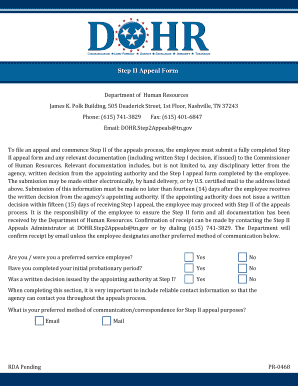
Get Step Ii Appeal Form Department Of Human Resources ... - Tn.gov - Tn
How it works
-

Open form follow the instructions
-

Easily sign the form with your finger
-

Send filled & signed form or save
How to fill out the Step II Appeal Form Department Of Human Resources online
Filling out the Step II Appeal Form is a crucial step in the appeals process for employees who wish to contest a decision made by their appointing authority. This guide will walk you through each section of the form to ensure that you complete it accurately and effectively.
Follow the steps to successfully complete your appeal form.
- Press the ‘Get Form’ button to access the Step II Appeal Form and open it in your preferred editor.
- Begin by indicating your employment status regarding preferred service. Select 'Yes' or 'No'.
- Next, confirm whether you have completed your initial probationary period. Again, choose 'Yes' or 'No'.
- Indicate if a written decision was issued by your appointing authority at Step I by selecting the appropriate response.
- Provide reliable contact information, including your preferred method of communication, so that the agency can reach you throughout the process.
- Fill in your personal information: name, mailing address, preferred phone number, personal email address, Edison ID number, agency name, job title, immediate supervisor's name, and official work location.
- Specify the law, rule, or policy that you believe was violated by the agency.
- Select the type of action resulting from the alleged violation, such as dismissal, demotion, or suspension, and, if applicable, indicate the number of suspension days.
- Provide a brief description of the reason for your appeal.
- State the date of your Step I discussion and the corrective action you are seeking, such as reinstatement of your job, back pay, or other remedies.
- Sign and date the form to confirm the information is accurate.
- After completing the form, ensure all necessary documentation is attached, and submit it electronically, via hand delivery, or by U.S. certified mail within the fourteen-day deadline.
- You may save changes to the document, download a copy for your records, print it, or share it as needed.
Ready to start your appeal process? Complete your Step II Appeal Form online now.
Want to appeal? Call TennCare Member Medical Appeals for free at 1-800-878-3192. They can help solve many problems before you have to appeal. They can also take your appeal over the phone.
Industry-leading security and compliance
US Legal Forms protects your data by complying with industry-specific security standards.
-
In businnes since 199725+ years providing professional legal documents.
-
Accredited businessGuarantees that a business meets BBB accreditation standards in the US and Canada.
-
Secured by BraintreeValidated Level 1 PCI DSS compliant payment gateway that accepts most major credit and debit card brands from across the globe.