Loading
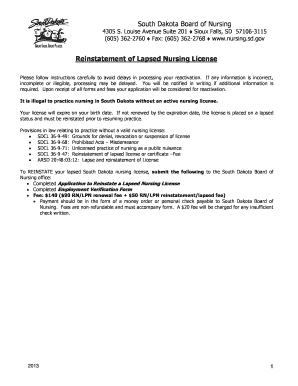
Get Reinstatement Of Lapsed Nursing License South Dakota Form
How it works
-

Open form follow the instructions
-

Easily sign the form with your finger
-

Send filled & signed form or save
How to fill out the Reinstatement Of Lapsed Nursing License South Dakota Form online
Reinstating your lapsed nursing license in South Dakota is a straightforward process when approached step by step. This guide is designed to assist you in accurately filling out the Reinstatement Of Lapsed Nursing License South Dakota Form online, ensuring a smooth and efficient application process.
Follow the steps to successfully complete the form online.
- Press the ‘Get Form’ button to access the application form. It will open in your editor for you to begin filling it out.
- In the section labeled 'I request to REINSTATE each license checked,' indicate whether you are reinstating your RN or LPN license by checking the appropriate box and entering your license number(s).
- Provide an explanation for why your nursing license lapsed in the field provided. Be detailed and honest to prevent any delays.
- Answer whether you have worked in South Dakota on your lapsed license by selecting 'YES' or 'NO'. If you select 'YES', indicate the location and dates where you practiced.
- Fill in your personal details, including your name, address, telephone numbers, date of birth, and email address. Ensure all information is legible and accurate.
- In the 'Declaration of Primary State of Residence' section, declare your primary state of residence. Provide documentation if necessary, such as your driver’s license or voter registration.
- If applicable, indicate whether you are employed by the military or practicing within a federal institution. Answer 'YES' or 'NO' as appropriate.
- Complete the 'Disciplinary Information' section carefully. If you answer 'YES' to any of the questions, prepare a detailed explanation and submit all required documents.
- Fill out the 'Employment and Education Information' sections, answering questions regarding your nursing degree, current employment status, and hours worked.
- Finalize the form by reviewing all sections for accuracy and completeness. Ensure that all required documents are included before submission.
- Once everything is filled out correctly, save your changes, download, print, or share the completed form as needed before submitting your application.
Begin the reinstatement process by completing your documents online now.
If you wish to have your license reinstated permanently, please email fpr.lmu@illinois.gov and request a reinstatement application. How do I check the status of my application? You will receive an email once your application has been reviewed. Please allow at least a week for processing.
Industry-leading security and compliance
US Legal Forms protects your data by complying with industry-specific security standards.
-
In businnes since 199725+ years providing professional legal documents.
-
Accredited businessGuarantees that a business meets BBB accreditation standards in the US and Canada.
-
Secured by BraintreeValidated Level 1 PCI DSS compliant payment gateway that accepts most major credit and debit card brands from across the globe.