Loading
Get As Recorded On This Form
How it works
-

Open form follow the instructions
-

Easily sign the form with your finger
-

Send filled & signed form or save
How to fill out the As Recorded On This Form online
This guide provides clear instructions on how to properly fill out the As Recorded On This Form online. Completing this form accurately is essential for the successful transfer of ownership for vehicles or vessels.
Follow the steps to effectively complete the form online.
- Click ‘Get Form’ button to obtain the form and open it in the editor.
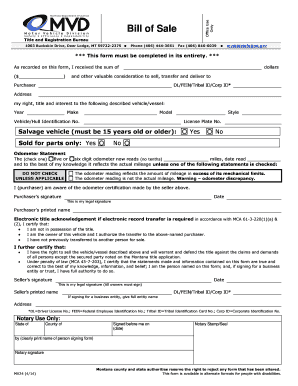
- Begin filling out the form by entering the amount received for the sale in the section marked 'I received the sum of ($________________) dollars and other valuable consideration to sell, transfer and deliver to Purchaser.'
- In the 'Purchaser' section, provide the purchaser's identification numbers, such as Driver License No., Federal Employee Identification No., Tribal Identification Card No., or Corporate Identification No., along with their address.
- Next, describe the vehicle or vessel being sold. This includes entering the Year, Make, Model, Style, Vehicle/Hull Identification Number, and License Plate Number.
- If the vehicle is a salvage vehicle, indicate if it is being sold for parts only by selecting 'Yes' or 'No'.
- For the odometer statement, check whether the vehicle has a five or six-digit odometer, and record the odometer reading (no tenths) along with the date it was read. Ensure to check the appropriate boxes for any odometer discrepancy that applies.
- Both the purchaser and seller must provide their signatures and printed names in the designated sections, along with the date.
- If applicable, complete the electronic title acknowledgment section by certifying that you are the owner and that you authorize the transfer.
- Finally, ensure all signatures are collected as required, and save changes. You can then download, print, or share the completed form.
Complete your documents online with confidence and ease.
Forms are documents that collect information from one's clients, customers, and respondents. Some common examples of forms include forms for purchases, incident reports, hazards, quality control, contact tracing, and feedback gathering.
Industry-leading security and compliance
US Legal Forms protects your data by complying with industry-specific security standards.
-
In businnes since 199725+ years providing professional legal documents.
-
Accredited businessGuarantees that a business meets BBB accreditation standards in the US and Canada.
-
Secured by BraintreeValidated Level 1 PCI DSS compliant payment gateway that accepts most major credit and debit card brands from across the globe.