Loading
Form preview
  • US Legal Forms
  • Other Templates
  • More Forms
  • More Uncategorized Forms
  • Oasis Forms For Home Health Care

Get Oasis Forms For Home Health Care

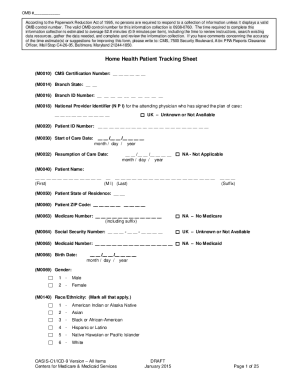
Nt Information Set Items to be Used at Specific Time Points Time Point Items Used Start of Care ---------------------------------------------------------------M0010-M0030, M0040-M0150, M1000-M1036, M1100M1306, M1308, M1320-M1410, M1600-M2002, M2010, Start of care further visits planned M2020-M2250 Resumption of Care ----------------------------------------------------M0032, M0080-M0110, M1000-M1036, M1100-M1306, M1308, M1320-M1410, M1600-M2002, M2010, M2020Resumption of care (after inpatient.

How it works

  1. Open form

    Open form follow the instructions

  2. Easily sign form

    Easily sign the form with your finger

  3. Share form

    Send filled & signed form or save

How to fill out the Oasis Forms For Home Health Care online

The Oasis Forms for Home Health Care are essential for documenting patient information and care needs. This guide provides clear instructions for users to navigate and complete these forms online effectively.

Follow the steps to fill out the Oasis Forms for Home Health Care online.

  1. Press the ‘Get Form’ button to access the Oasis Forms and open the document for editing.
  2. Begin with the Home Health Patient Tracking Sheet section. Enter the CMS Certification Number (M0010) as required.
  3. Proceed to fill in the Personal Information section (M0040 to M0066). Enter the patient name, state of residence, Medicare number, and other identifying details.
  4. Next, enter the patient’s medical history and diagnosis information. Ensure fields such as Inpatient Facility Discharge Date (M1005) and the list of diagnoses (M1010) are correctly filled out.
  5. Complete the Assessment section, which includes items like Discipline of Person Completing Assessment (M0080) and date of assessment (M0090).
  6. Once all sections are filled, review the entire form for accuracy. Finally, you can choose to save changes, download, print, or share the completed form.

Don't hesitate to complete the Oasis Forms for Home Health Care online today.

Get form

Experience a faster way to fill out and sign forms on the web. Access the most extensive library of templates available.
Get form

Related content

Home Health Patient Tracking Sheet - CMS
If you have comments concerning this form, please ... (M0150) Current Payment Sources for...
Learn more
OASIS|Home Health Assessment - ResDAC
OASIS assessments collect home health patient outcome information for all...
Learn more
National Voluntary Consensus Standards for Home...
cms.hhs.gov/oasis/oasisdat.asp. Last accessed August 2, 2004. 3. For all OBQI and OBQM...
Learn more

Related links form

Printable Siding Forms Indemnity-medical-claim-form-gccpdf Faretta Warnings Fort Hood Blc

Questions & Answers

Get answers to your most pressing questions about US Legal Forms API.

Contact support

The new OASIS-E assessment is effective on January 1, 2023. It comes with major revisions that standardize data across post-acute care settings to allow the Centers for Medicare and Medicaid Services (CMS) to uniformly collect social determinants of health data and standardize quality measures driven by the IMPACT Act.

Oasis released three more studio albums, Heathen Chemistry (2002), Don't Believe the Truth (2005) and Dig Out Your Soul (2008). The group abruptly disbanded after the departure of Noel Gallagher in August 2009.

Upon successful log-in, the user is presented with the CMS QIES System welcome page. To Submit an OASIS file select the OASIS Submissions link and follow the upload instructions. It is important to note that OASIS files must now be in a zip format. The default menu item displayed is File Upload.

Elevate your Understanding – What's new with OASIS-E? The revisions on the horizon represent data set item additions and removals, new assessment items, changes in guidance for current items, and a complete restructuring of sections and item numbers to match data assessment items in other Post-Acute care settings.

The short answer is 27. There are 27 new items on OASIS E compared to OASIS D1. Often, an OASIS Item is removed, only to be replaced by a question or questions seeking more specific information. For Example, M1040 has been removed and been replaced by A1005 (Ethnicity), A1010 (Race), and A1110 (Language).

The Outcome and Assessment Information Set (OASIS) is a group of standard data elements designed to enable systematic comparative measurement of home health care patient outcomes at two points in time in adult skilled Medicare and Medicaid, non-maternity home health care patients.

OASIS data are used for multiple purposes including calculating several types of quality reports which are provided to home health agencies to help guide quality and performance improvement efforts. OASIS-D1 is the current version of the OASIS data set.

The Outcome and Assessment Information Set (OASIS) is a group of standard data elements designed to enable systematic comparative measurement of home health care patient outcomes at two points in time in adult skilled Medicare and Medicaid, non-maternity home health care patients.

Get This Form Now!

Use professional pre-built templates to fill in and sign documents online faster. Get access to thousands of forms.
Get form
If you believe that this page should be taken down, please follow our DMCA take down processhere.
Get Oasis Forms For Home Health Care
Get form
  • Adoption
  • Bankruptcy
  • Contractors
  • Divorce
  • Home Sales
  • Employment
  • Identity Theft
  • Incorporation
  • Landlord Tenant
  • Living Trust
  • Name Change
  • Personal Planning
  • Small Business
  • Wills & Estates
  • Packages A-Z
  • Affidavits
  • Bankruptcy
  • Bill of Sale
  • Corporate - LLC
  • Divorce
  • Employment
  • Identity Theft
  • Internet Technology
  • Landlord Tenant
  • Living Wills
  • Name Change
  • Power of Attorney
  • Real Estate
  • Small Estates
  • Wills
  • All Forms
  • Forms A-Z
  • Other Templates
  • Legal Hub
  • About Us
  • Help Portal
  • Legal Resources
  • Blog
  • Affiliates
  • Contact Us
  • Delete My Account
  • Site Map
  • Industries
  • Forms in Spanish
  • Localized Forms
  • State-specific Forms
  • Forms Kit
  • Real Estate Handbook
  • All Guides
  • Notarize
  • Incorporation services
  • For Consumers
  • For Small Business
  • For Attorneys
  • USLegal
  • FormsPass
  • pdfFiller
  • signNow
  • altaFlow
  • DocHub
  • Instapage
Form Packages
  • Adoption
  • Bankruptcy
  • Contractors
  • Divorce
  • Home Sales
  • Employment
  • Identity Theft
  • Incorporation
  • Landlord Tenant
  • Living Trust
  • Name Change
  • Personal Planning
  • Small Business
  • Wills & Estates
  • Packages A-Z
Form Categories
  • Affidavits
  • Bankruptcy
  • Bill of Sale
  • Corporate - LLC
  • Divorce
  • Employment
  • Identity Theft
  • Internet Technology
  • Landlord Tenant
  • Living Wills
  • Name Change
  • Power of Attorney
  • Real Estate
  • Small Estates
  • Wills
  • All Forms
  • Forms A-Z
  • Other Templates
Customer Service
  • Legal Hub
  • About Us
  • Help Portal
  • Legal Resources
  • Blog
  • Affiliates
  • Contact Us
  • Delete My Account
  • Site Map
  • Industries
  • Forms in Spanish
  • Localized Forms
  • State-specific Forms
  • Forms Kit
Legal Guides
  • Real Estate Handbook
  • All Guides
Prepared for you
  • Notarize
  • Incorporation services
Our Customers
  • For Consumers
  • For Small Business
  • For Attorneys
Our Sites
  • USLegal
  • FormsPass
  • pdfFiller
  • signNow
  • altaFlow
  • DocHub
  • Instapage
Social Media
Call us now toll free:
+1 833 426 79 33
As seen in:
© Copyright 1999-2026 airSlate Legal Forms, Inc. 17 Station Street, Ste. 203, Brookline, MA 02445
  • Your Privacy Choices
  • Terms of Service
  • Privacy Notice
  • Content Takedown Policy
  • Bug Bounty Program