Loading
Get Asabank
How it works
-

Open form follow the instructions
-

Easily sign the form with your finger
-

Send filled & signed form or save
How to fill out the Asabank online
This guide provides clear instructions for users on how to complete the Asabank Customer Registration Form online. By following these steps, individuals will ensure that all necessary information is accurately submitted.
Follow the steps to successfully complete the form.
- Press the ‘Get Form’ button to access the Asabank Customer Registration Form and open it in the editor.
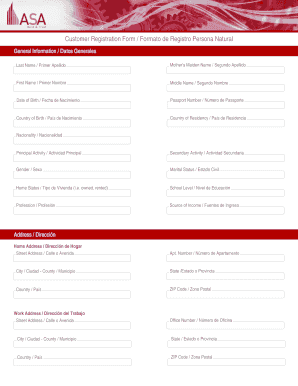
- Begin by filling out the 'General Information' section. This includes providing your last name, mother's maiden name, first name, middle name, date of birth, passport number, country of birth, country of residency, nationality, principal activity, secondary activity, gender, marital status, home status, school level, profession, and source of income.
- Next, complete your address information. Fill in the home address, including street address, apartment number, city, state or province, country, and ZIP code. Repeat this for your work address and mailing address if they differ.
- Provide your telephone numbers, including home phone, cell phone, office phone, and fax number.
- Enter your email address for all communications with the bank. Ensure this information is accurate and up to date.
- Select all products you wish to activate. This includes options such as saving accounts, current accounts, and certificates of deposit.
- Review the requisites for account activation and ensure all necessary documents are prepared, including identification, reference letters, and proof of residency.
- Fill in the authorized signatures section, including fingerprints and names where required.
- Finally, review the affidavit statement at the end of the form, sign, and date it. Once complete, you can save your changes, download the completed form, print it for your records, or share it as needed.
Complete your Asabank Customer Registration Form online with confidence today!
For assistance please contact membership@asanet.org or call 202-383-9005 Ext. 1.